
ASUS Pro WS W890E-SAGE SE
5.0Editor score
Ready for Intel Xeon 600
NitroPath DRAM technology support
Seven PCIe 5.0 x16 slots
This guide compares the top ASUS server motherboards for workstations and enterprise use, focusing on performance, connectivity, and reliability features.
Selecting the right server motherboard is crucial for building reliable workstations and enterprise systems that handle demanding computational tasks efficiently and consistently.
We analyzed ten top-rated ASUS models based on connectivity options, power delivery, compatibility with latest processors, and remote management capabilities for professional environments.
Each pick highlights unique strengths for specific use cases from AI rendering to virtualization, though prices fluctuate so always verify current listings before purchasing hardware.
5.0Editor score

3.7Editor score
4.3Editor score
Here is a side-by-side comparison of all ten selected ASUS server motherboards highlighting their key specifications and intended use cases.


The ASUS Pro WS WRX90E-SAGE SE stands out as a top choice for heavy computational workloads with its support for up to 96-core AMD Ryzen Threadripper PRO 7000 WX-Series processors.
We may earn a commission when you buy through this link, at no additional cost to you.
Its seven PCIe 5.0 x16 slots provide unparalleled expansion for multi-GPU setups or high-speed storage arrays while dual 10Gb LAN ports ensure enterprise-level network throughput.
While the price is steep and requires specific AMD CPUs, the robust 32 power stage design and comprehensive thermal cooling validate the investment for mission-critical 24/7 server environments.
Experts recommend this board for data centers, AI training stations, or any professional workstation needing maximum core counts and extensive I/O bandwidth.
Seven PCIe 5.0 x16 slots allow for extensive multi-GPU or storage configurations without bandwidth bottlenecks.
Dual 10Gb LAN ports plus IPMI remote management make this ideal for servers needing fast connectivity and remote access.
We may earn a commission when you buy through this link, at no additional cost to you.
The ASUS Pro WS W890E-SAGE SE targets the premium Intel workstation market with support for next-gen Xeon 600 processors and advanced AI computing capabilities.
We may earn a commission when you buy through this link, at no additional cost to you.
Key strengths include seven PCIe 5.0 x16 slots for massive expansion and NitroPath DRAM technology that enhances memory performance and stability for demanding applications.
Trade-offs involve the requirement for new CPU sockets and a high price, but the dual 10Gb LAN and server-grade IPMI justify costs for professional AI or rendering farms.
This board is ideal for IT departments or creative professionals needing top-tier Intel performance with robust remote management and connectivity options.
Designed for Intel Xeon 600 series, this board ensures longevity for high-end workstation and server deployments.
Includes USB4 and USB 20Gbps Type-C alongside dual 10Gb LAN for versatile high-speed data transfers.
We may earn a commission when you buy through this link, at no additional cost to you.
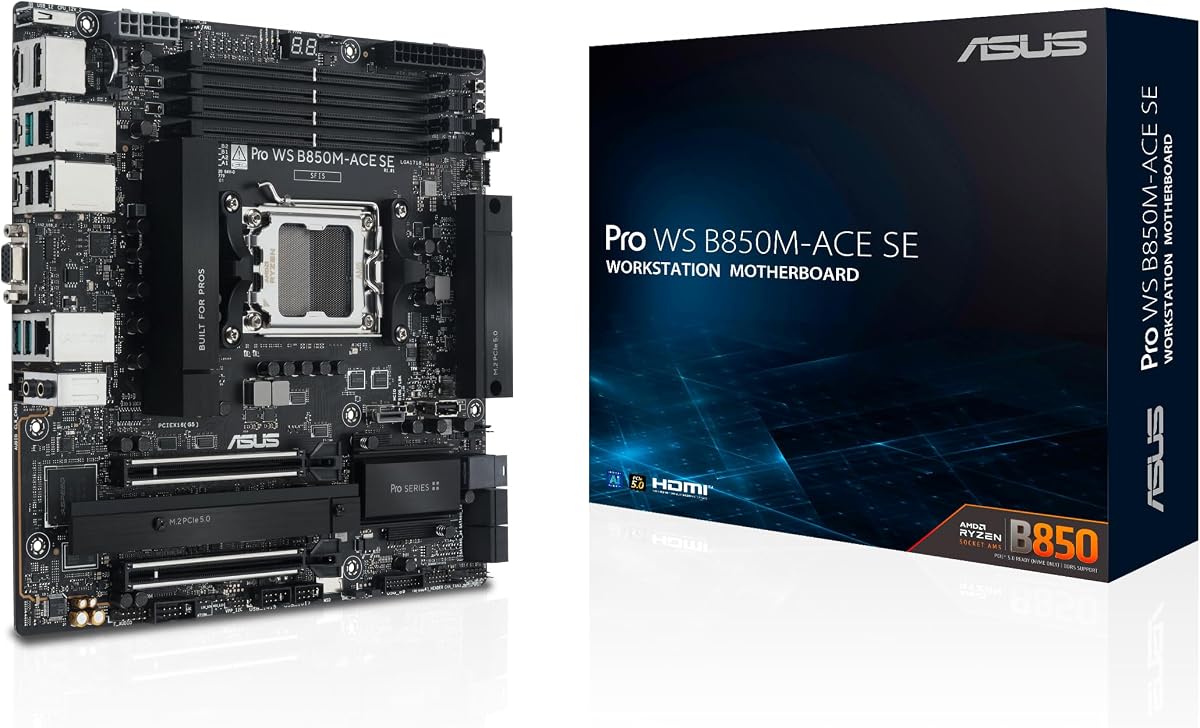
The ASUS Pro WS B850M-ACE SE offers an affordable entry into server-grade motherboards with AMD AM5 socket support and built-in IPMI management.
We may earn a commission when you buy through this link, at no additional cost to you.
Standout features include dual PCIe 5.0 M.2 slots for fast boot storage and a 10G & 2.5G LAN combo that provides flexible network options for small businesses.
While the compact mATX size limits total PCIe slot count, this board is perfect for compact workstations or small servers needing reliable remote management.
Budget-conscious buyers will appreciate the balance of performance and server features without the cost of full-size EEB or E-ATX boards.
MicroATX form factor makes this ideal for smaller server racks or compact workstation cases without sacrificing key features.
Onboard BMC and IPMI control make this affordable board suitable for remote server management right out of the box.
We may earn a commission when you buy through this link, at no additional cost to you.
The ASUS Pro WS W890-SAGE is built for Intel workstation users who want flexibility through IPMI expansion cards rather than onboard BMC controllers.
We may earn a commission when you buy through this link, at no additional cost to you.
It features seven PCIe 5.0 x16 slots and SlimSAS support making it great for storage-heavy workstations requiring high-speed data access and GPU expansion.
While it lacks an integrated BMC, the readiness for IPMI expansion cards offers customization for IT departments needing specific management hardware.
Ideal for IT admins building custom server or workstation rigs who prefer modular management cards over pre-integrated remote management solutions.
Support for IPMI expansion cards allows organizations to standardize on preferred management hardware across multiple builds.
SlimSAS support ensures compatibility with high-performance NVMe storage arrays for rapid data throughput and access.
We may earn a commission when you buy through this link, at no additional cost to you.
The ASUS Pro WS TRX50-SAGE WIFI adds next-gen WiFi 7 connectivity to a powerful AMD Threadripper PRO workstation motherboard.
We may earn a commission when you buy through this link, at no additional cost to you.
Key strengths include robust 36 power stages and support for up to 1TB ECC R-DIMM DDR5 memory ensuring stability under heavy multi-core loads.
While built-in WiFi is not needed in all data centers, it benefits remote workstations or creative studios needing high-speed wireless access.
Recommended for professionals who need top-tier AMD performance alongside flexible connectivity without relying solely on Ethernet.
Built-in WiFi 7 offers ultra-fast wireless connectivity for workstations needing flexible placement without cables.
Support for up to 1TB ECC R-DIMM DDR5 ensures smooth multitasking and handling of massive datasets.
We may earn a commission when you buy through this link, at no additional cost to you.
The ASUS Pro WS TRX50-SAGE WiFi A distinguishes itself with robust CPU and memory overclocking readiness for AMD Ryzen Threadripper processors.
We may earn a commission when you buy through this link, at no additional cost to you.
It features three PCIe 5.0 x16 slots plus USB4 ports with 40Gbps speeds providing excellent connectivity for high-end peripherals and expansion.
While 20 power stages are fewer than some rivals, the design remains stable for workstation overclocking within safe thermal limits.
This board is perfect for enthusiasts and professionals needing raw performance tweaks alongside modern USB4 connectivity in a workstation setting.
Designed to support overclocking of both CPU and memory for users pushing AMD Threadripper performance beyond stock settings.
Two USB4 ports delivering 40Gbps speeds enable blazing-fast data transfer and support for external high-speed storage.
We may earn a commission when you buy through this link, at no additional cost to you.
The ASUS Pro WS W680-ACE IPMI delivers strong value for Intel workstation users with bundled IPMI expansion cards and ECC memory support.
We may earn a commission when you buy through this link, at no additional cost to you.
It supports Intel 13th Gen Core processors plus ECC memory for data integrity which is critical for workstation reliability and server-like uptime.
While it only offers dual PCIe 5.0 slots, the bundled IPMI card and Thunderbolt 4 header make it versatile for remote management and high-speed peripherals.
Best for businesses or professionals needing an affordable Intel workstation motherboard with server-grade remote management and data integrity features.
IPMI expansion card bundled means immediate server-grade remote management without needing extra purchases at checkout.
Support for ECC memory ensures data integrity and reduces errors during critical computation and long running tasks.
We may earn a commission when you buy through this link, at no additional cost to you.
The ASUS P12R-M/10G-2T is a reliable choice for legacy Intel server deployments needing compact Micro ATX form factor in standard racks.
We may earn a commission when you buy through this link, at no additional cost to you.
It supports Intel Xeon E-2300 processors via LGA-1200 socket with 10G Ethernet support ensuring fast networking for small business servers.
Trade-offs include older socket support limiting CPU upgrades, but this ensures compatibility with existing systems and lower costs.
Best for small businesses maintaining existing Intel server infrastructure needing reliable networking in a compact motherboard form.
Micro ATX design allows fitting into compact server cases or tight rack spaces without compromising core server features.
10G Ethernet support ensures data centers can maintain high bandwidth networking without requiring expensive add-on cards.
We may earn a commission when you buy through this link, at no additional cost to you.
The ASUS Z13PE-D16 targets enterprise servers needing two Xeon CPUs plus massive memory capacity through its E-ATX form factor.
We may earn a commission when you buy through this link, at no additional cost to you.
Key strengths include support for two Intel Xeon 5th Gen processors and up to 4TB RAM across 16 DDR5 slots for heavy workloads.
Trade-offs involve needing a larger E-ATX chassis and significant investment, but performance for virtualization and database servers is unmatched.
Ideal for enterprise data centers requiring maximum multi-core performance and extensive memory for virtualization or database management.
16 DDR5 slots supporting up to 4TB RAM enable handling massive datasets and extensive virtualization environments.
Dual LGA 4677 sockets allow two Xeon CPUs for unmatched processing power in enterprise server environments.
We may earn a commission when you buy through this link, at no additional cost to you.
The ASUS Pro WS W680-ACE IPMI offers a balanced workstation solution with legacy display outputs alongside modern networking and storage features.
We may earn a commission when you buy through this link, at no additional cost to you.
It supports Intel 13th Gen Core processors plus 3x M.2 PCIe 4.0 slots providing flexibility for both legacy and new display hardware.
Trade-offs include limited PCIe 5.0 support but the mix of HDMI, DisplayPort, and VGA ensures compatibility across various monitor generations.
Best for IT departments needing reliable workstations supporting older legacy monitors plus modern storage and network requirements efficiently.
Includes HDMI, DisplayPort and VGA outputs ensuring compatibility with both new and older monitor generations.
SlimSAS and 3x M.2 PCIe 4.0 plus 2x 2.5Gb Ethernet ensure robust storage and network capabilities for workstations.
We may earn a commission when you buy through this link, at no additional cost to you.
Selecting the right server motherboard depends on your workload requirements processor compatibility and necessary expansion features.
Ensure the motherboard socket matches your intended CPU whether AMD Threadripper or Intel Xeon to avoid compatibility issues and maximize performance.
Always verify the CPU generation supported by the socket type before purchasing any motherboard for your build.
Determine how many PCIe slots you need for GPUs or storage cards and choose a board that supports PCIe 5.0 for future-proofing bandwidth.
More slots provide greater flexibility for multi-GPU setups or NVMe storage arrays but may require larger chassis size.
Check maximum supported RAM capacity and whether it includes ECC support essential for server reliability and data integrity.
Prioritize boards supporting large memory capacities if running virtual machines or databases requiring substantial storage.
Look for dual 10Gb Ethernet ports if you need high-speed networking and USB4 or SlimSAS if external storage is critical.
Modern server boards should offer flexible I/O options to support diverse workstation and server workflows.
Server-grade IPMI remote management is vital for IT admins needing to monitor and control systems remotely without physical access.
Check if the board includes onboard BMC or requires a separate expansion card for this functionality.
Robust power stages and comprehensive VRM cooling ensure stable CPU performance under sustained heavy loads found in servers.
Higher power stage counts generally indicate better overclocking support and thermal stability for mission-critical workloads.
Choose between ATX, EEB, or E-ATX depending on your chassis size and desired expansion capabilities for your build.
Larger E-ATX boards offer more slots but require compatible cases while smaller options save space.
Balance cost against features prioritizing essential server functionality like IPMI or PCIe 5.0 for your specific needs.
Higher priced boards often include more expansion slots and better reliability validated for 24/7 operation.
Proper installation involves securing the motherboard on standoff screws and connecting all power cables firmly to ensure stable performance.
Keep your BIOS updated regularly using ASUS Control Center Express to maintain security patches and hardware compatibility for processors and RAM.
Clean internal components with compressed air periodically and ensure adequate airflow to prevent overheating during continuous server operation.
ASUS server motherboards include ECC memory support IPMI remote management and are validated for 24/7 operation which consumer boards typically lack. They also feature more PCIe slots and robust power delivery for sustained workloads.
IPMI is essential if you need to manage your server remotely without physical access. It allows monitoring system health and rebooting remotely making it ideal for data centers or unattended builds.
AMD sTR5 offers high core counts for rendering while Intel LGA 4710-2 and LGA 4677 provide balanced performance for business workloads. Match your CPU choice to your workload priorities.
Some models like W680 support 13th Gen Core CPUs but most focus on Threadripper PRO or Xeon processors optimized for server workloads and stability.
PCIe 5.0 offers double the bandwidth of PCIe 4.0 enabling faster data transfer for GPUs and NVMe drives which is crucial for AI and rendering workloads.
ECC memory is not mandatory but recommended for servers needing high data integrity and reliability. It prevents corruption during long calculations and critical tasks.
Our top picks include the Pro WS WRX90E-SAGE SE for maximum performance and the Pro WS B850M-ACE SE for budget-conscious workstation builders.
Prioritize processor compatibility and IPMI management needs before selecting a model that aligns with your infrastructure requirements.
Always verify current prices and availability since server component costs can fluctuate based on demand and stock levels.