
Creality Ender 3 V3 SE
3.8Editor score
CR Touch Auto Leveling
Sprite Direct Extruder
Dual Z-Axis Stability
This guide compares the top auto bed leveling 3D printers for beginners, evaluating ease of use, speed, and build quality to help you choose the right machine.
Choosing the right 3D printer can be overwhelming for newcomers. Auto bed leveling simplifies the process by ensuring a perfect first layer every time. This feature is essential for beginners who want reliable results without tedious manual calibration.
We evaluated ten highly rated models based on user feedback, technical specifications, and ease of setup. Our focus was on printers that offer automated leveling, stable motion systems, and intuitive interfaces suitable for those new to additive manufacturing.
Each pick highlights specific strengths like speed, material compatibility, or build volume. While prices fluctuate frequently, the features listed remain consistent. Check current availability before deciding to ensure you get the best value for your specific needs.
3.8Editor score

4.3Editor score

4.3Editor score
The following table provides a side-by-side comparison of all ten models selected for this guide. It highlights key specifications like print speed, build volume, and unique features to help you quickly identify which printer aligns with your project requirements.


The FLASHFORGE Adventurer 5M stands out as a top contender for beginners seeking speed and simplicity. With a rating of 4.3 stars, users praise its ability to produce high-quality prints without complex setup. The auto-leveling system ensures you start each project with confidence.
We may earn a commission when you buy through this link, at no additional cost to you.
Its Core XY motion system allows for speeds up to 600mm/s, significantly reducing print times. The direct extruder supports a wide range of materials, while the PEI coating plate makes removing prints effortless. Vibration compensation minimizes ghosting, resulting in smoother surfaces even on fast prints.
While it is an open-frame printer which limits some high-temp materials, the trade-off is a lighter footprint and better ventilation. Beginners will appreciate the filament run-out sensor and power loss recovery features that protect against interruptions.
This printer is ideal for those who want to dive straight into printing with minimal tinkering. If you value speed and ease of use over enclosed printing, the Adventurer 5M is a strong choice.
The 600mm/s speed and 0.025s acceleration mean you spend less time waiting and more time creating.
One-click auto leveling calibrates the bed properly so you get a perfect first layer every time.
We may earn a commission when you buy through this link, at no additional cost to you.
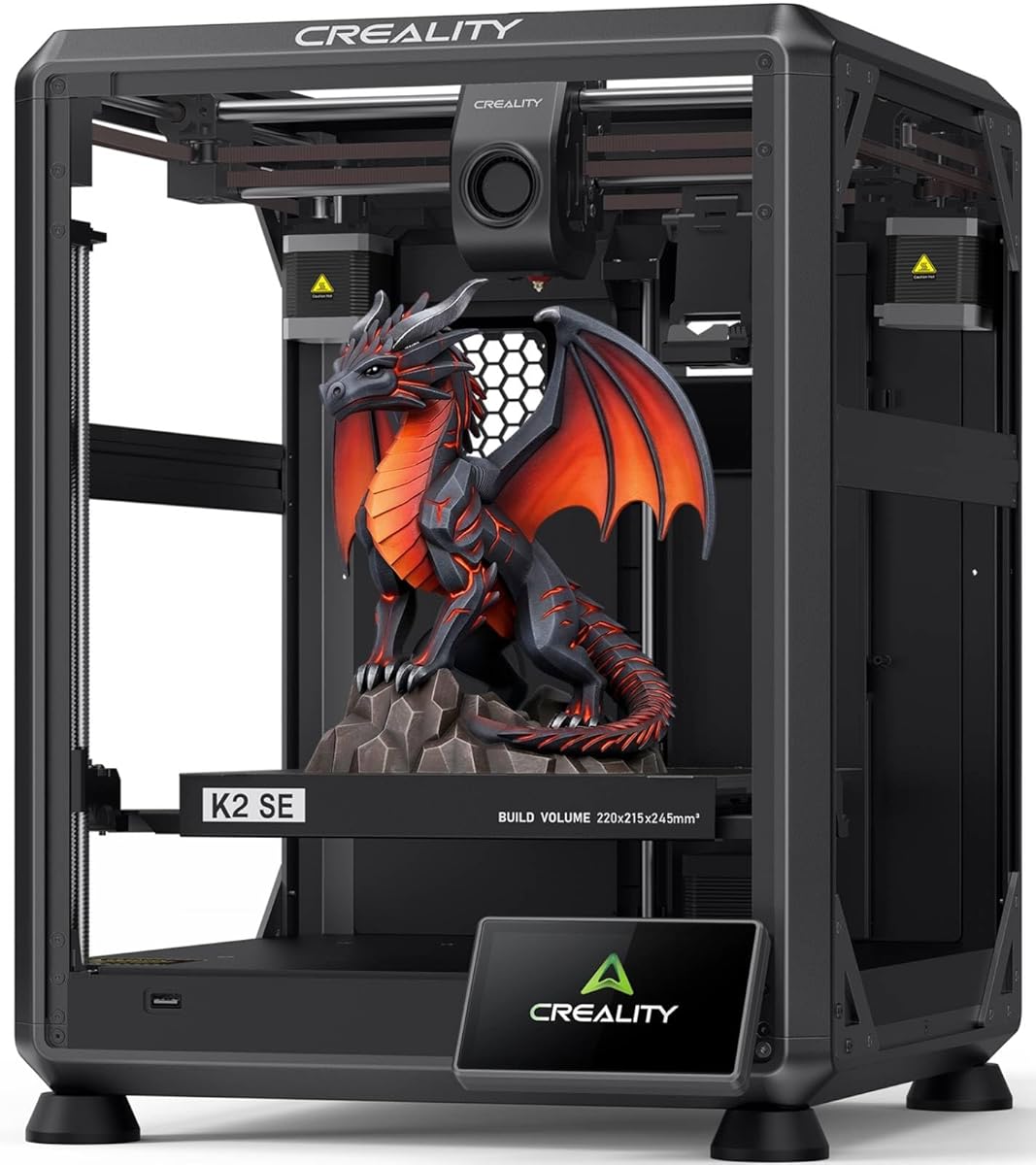
The Creality K2 SE is designed for users who want a robust build and high-speed capabilities. While its rating is slightly lower at 3.8 stars, its solid metal frame offers exceptional rigidity. This helps maintain accuracy even during rapid movements.
We may earn a commission when you buy through this link, at no additional cost to you.
Its CoreXY motion system delivers speeds up to 500mm/s. The built-in vibration sensor and input shaping algorithm actively reduce ringing. The K2 SE is compatible with the Creality CFS system for multi-color printing, making it a scalable choice for growing hobbyists.
Setup is quick with just a 5-minute assembly process. The touchscreen guide helps you tune the printer automatically. However, the need to buy the CFS system separately for multi-color features adds to the overall cost.
This model is suitable for those planning to expand into multi-material printing later. If you prioritize structural stability and speed, the K2 SE is a compelling option despite its current mixed reviews.
Die-cast aluminum alloy frame minimizes frame flex during rapid movement for reliable dimensional accuracy.
Creality OS supports expert-mode tuning and LAN multi-printer control for advanced management needs.
We may earn a commission when you buy through this link, at no additional cost to you.
The E-Leveler 2 is a specialized tool designed to assist with manual bed leveling on 3D printers. It is not a printer itself but an electronic device that provides visual feedback. With a 4.3-star rating, users find it helpful for ensuring a perfectly level bed.
We may earn a commission when you buy through this link, at no additional cost to you.
It features a stronger battery holder and improved LED indicator. The arrows guide you on how to adjust the bed. It is compatible with most 3D printers that have manually adjustable print beds.
While it is a tool rather than a printer, it helps beginners achieve better results when their machine does not have auto-leveling. It balances well on end caps which acts as legs. This makes the leveling process even easier.
This product is useful for users with older printers lacking auto-leveling features. If you need a simple way to verify your bed level, the E-Leveler 2 is a reliable and affordable tool to add to your toolkit.
The LED light provides clear visual cues while you adjust the bed for a perfectly level surface.
New features like balancing end caps make the tool stable and easy to handle during calibration.
We may earn a commission when you buy through this link, at no additional cost to you.
The FLASHFORGE AD5M is another excellent option from Flashforge offering fast speeds and auto-leveling. It features a 4.3-star rating and combines new technology with superior craftsmanship. The automatic one-click leveling system measures nozzle-to-build plate distance precisely.
We may earn a commission when you buy through this link, at no additional cost to you.
The all-metal CoreXY structure ensures high-speed printing without compromising quality. The patented quick-release nozzle can be swapped in as little as 3 seconds. This simplifies maintenance for novices and experts alike.
It includes power outage resume capability and a flexible double-sided PEI steel plate. The Orca-flashforge slicer enables one-click batch file transmission. This helps you manage devices and monitor prints remotely via the Flash Maker APP.
This printer is a great companion for beginners and experts alike who want reliable calibration. If you need a versatile machine that balances speed with ease of maintenance, the AD5M is worth considering.
Patent Quick-Release Nozzle allows tool-free swapping in as little as 3 seconds.
Orca-flashforge slicer enables one-click batch file transmission and multi-printer network monitoring.
We may earn a commission when you buy through this link, at no additional cost to you.
The QIDI Q2 redefines the first 3D printer with professional features. It acts as a leveling sensor ensuring first-layer accuracy. With a 4.3 rating, it covers entry-to-expert projects. The 65°C heated chamber minimizes warping.
We may earn a commission when you buy through this link, at no additional cost to you.
The 370°C nozzle unlocks advanced materials like PPS-CF. It features full-metal CoreXY structure and precision linear rails. AI camera monitoring and power-loss recovery ensure reliable results. The triple filtration system reduces odors and particles.
While it is more advanced than typical beginner printers, it offers unmatched stability. The 2nd-gen PTC heated chamber ensures strong layer adhesion. This is ideal for those who need robust printing capabilities.
This printer is for those who want a machine that grows with their skills. If you plan to work with engineering materials, the Q2 is a powerful and safe choice.
The Q2 nozzle acts as the leveling sensor delivering unmatched first-layer accuracy.
The 370°C high-temp nozzle unlocks advanced materials like PPS-CF for professional projects.
We may earn a commission when you buy through this link, at no additional cost to you.
The FLASHFORGE 5M Pro is a versatile tool for parent-child bonding and household repairs. It features automatic leveling with one click. With a 4.0 rating, it ensures a flawless first layer every time. The closed structure optimizes air quality.
We may earn a commission when you buy through this link, at no additional cost to you.
It includes a HEPA13 and activated carbon filter to block 99% of particulate matter. This makes it safe for home use. It supports multi-material applications with a 280°C extruder. The nozzle bundle provides flexibility.
Standard mode is 50dB but there is a low-speed silent mode for focus. Orca-Flashforge slicer supports one-click group file sending. You can manage devices via the Flash Maker APP.
This model is ideal for classroom or home use where air quality matters. If you need a quiet, safe printer for beginners, the 5M Pro is a great option.
Closed structure and dual filtration system block 99% of particulate matter for safe home use.
Orca-Flashforge slicer supports one-click group file sending and multi-printer network monitoring.
We may earn a commission when you buy through this link, at no additional cost to you.
The Creality Ender 3 V3 SE is a popular choice for beginners. It supports a maximum printing speed of 250mm/s. With a 3.8 rating, users appreciate the CR Touch sensor for auto leveling. The dual Z-axis reduces wobbling.
We may earn a commission when you buy through this link, at no additional cost to you.
It comes with the upgraded Sprite direct extruder. It saves 73% of time compared with other printers. Preassembly means it only takes 20 minutes from unpacking to first print. Auto filament loading simplifies changes.
The dual Z-axis lead screws avoid deviation. The strain sensor helps with auto Z-offset. Official support provides 12-month after-sales service. This ensures help is available when needed.
This printer is great for those on a budget. If you want reliable performance with proven upgrades, the Ender 3 V3 SE is a solid entry point.
Supports 250mm/s with 2500mm/s² acceleration saving time compared to standard printers.
Preassembly solved hassles taking only 20 minutes from unpacking to first printing.
We may earn a commission when you buy through this link, at no additional cost to you.
The Creality CR Touch kit adds auto leveling to existing Ender printers. It features multi-point detection and records height at each point. With a 4.4 rating, users appreciate the smart compensation system.
We may earn a commission when you buy through this link, at no additional cost to you.
It is based on hundreds of millions of user data. It performs multi-point detection on the printing platform. It builds a virtual plane to calculate tilt angle. This auto compensates for different points.
Firmware update is required to download. It is suitable for Ender 3 Pro and V2 versions. Reusable for more than 100,000 times. It saves money compared to buying a new printer.
This kit is for those with older machines. If you want auto leveling without replacing your printer, the CR Touch is a cost-effective solution.
The system builds a virtual plane based on height of each point to calculate tilt angle.
Compatible with Ender 3 Pro and V2 versions offering stable and stable solutions.
We may earn a commission when you buy through this link, at no additional cost to you.
The FLASHFORGE AD5X features multi-color printing capability with up to four colors. With a 4.0 rating, it allows vibrant designs. The Intelligent Filament System ensures seamless management. It detects and refills filament automatically.
We may earn a commission when you buy through this link, at no additional cost to you.
It has a maximum printing speed of 600mm/s. The acceleration is 20,000mm/s. It is constructed with an all-metal Core XY structure. This minimizes vibrations. It supports flexible TPU printing.
Large printing size is 220 x 220 x 220mm. This accommodates diverse printing tasks. The IFS minimizes downtime. This enhances productivity for users.
This printer is ideal for artists and designers. If you want vibrant multi-color prints with auto-leveling, the AD5X is a great choice.
Allows users to create vibrant and intricate designs with up to four colors simultaneously.
Maximum speed of 600mm/s allows for quicker project turnaround times.
We may earn a commission when you buy through this link, at no additional cost to you.
The Creality Ender 3 V3 SE is designed for beginners. It can be assembled in just a few simple steps. With a 4.1 rating, it uses CR Touch Auto Leveling to achieve a reliable first layer. The dual Z-axis lead screws reduce vibration.
We may earn a commission when you buy through this link, at no additional cost to you.
It prints at speeds of up to 250mm/s. The upgraded Sprite Direct Drive Extruder provides smooth feeding. A 32-bit silent mainboard reduces operating noise. The flexible build plate allows printed models to be removed quickly.
The stable motion system helps with consistent results. It works for PLA, PETG, and TPU. It helps reduce vibration and Z wobble. This supports accurate layer alignment.
This printer is great for those starting out. If you want a quiet and reliable beginner printer, the Ender 3 V3 SE is a solid choice.
CR Touch Auto Leveling and automatic Z-offset calibration help achieve a reliable first layer.
A 32-bit silent mainboard helps reduce operating noise for a comfortable experience.
We may earn a commission when you buy through this link, at no additional cost to you.
Choosing the right printer involves understanding key features that impact ease of use. This guide breaks down the most important factors to consider before making a purchase.
Auto leveling is crucial for beginners to avoid failed prints. Look for one-click systems that use probes or sensors to measure the bed surface. This ensures the nozzle maintains the correct distance throughout the print.
Prioritize printers with reliable auto-leveling to save time and frustration. A good system will compensate for bed warping automatically.
The build volume determines the size of objects you can print. Beginners should choose a size that fits their intended projects. Most models offer 220x220x250mm which is standard for hobbyist use.
Ensure the build volume meets your needs before buying. A larger area offers more flexibility but may cost more.
Higher speeds reduce wait times for finished objects. Some models offer up to 600mm/s which is significantly faster than standard printers. Ensure the speed does not compromise print quality.
Look for printers that balance speed with precision. High acceleration can lead to vibrations if not compensated.
Direct drive extruders are better for flexible materials like TPU. They provide more control over filament feeding compared to Bowden systems. This reduces jams and improves print reliability.
Choose a direct drive extruder for versatile material support. It is a key feature for successful printing.
Different printers support different materials. Some only work with PLA while others support ABS or PETG. Check the maximum nozzle temperature to ensure it meets your requirements.
Select a printer compatible with your desired filament types. This expands your project possibilities.
CoreXY and Cartesian are common motion systems. CoreXY offers higher speeds and stability. It is often found in modern high-performance printers.
Consider the motion structure for reliability. A stable frame ensures consistent prints over time.
Safety features like power loss recovery and filament run-out sensors protect your projects. Enclosed printers offer better safety for certain materials. Filtration systems reduce airborne particles.
Prioritize safety features to protect your home and health. It is important for indoor printing.
A touchscreen interface makes operation easier for beginners. Look for intuitive menus and setup wizards. Good connectivity options like USB or SD card support are essential.
Choose a printer with a user-friendly interface. It simplifies the learning process.
Start by assembling your printer according to the manual. Ensure all connections are secure before powering on. This prevents damage and ensures safety during operation.
Use the auto leveling feature before each print to ensure a perfect first layer. This step is critical for adhesion and print success. Regularly clean the print bed to maintain performance.
Store filaments in a dry environment to prevent moisture absorption. Keep the printer clean and free of dust. Perform maintenance like lubricating rods to extend the life of your machine.
Auto leveling is a feature that uses sensors to measure the distance between the nozzle and the print bed. It adjusts the printer settings to compensate for any unevenness. This ensures a consistent and accurate first layer every time.
No, not all beginner printers come with auto leveling. Some entry-level models require manual leveling which can be tedious. Look for the specific feature in the specifications before buying.
Auto leveling ensures the nozzle is at the correct height across the entire bed. This prevents issues like first layer squish or poor adhesion. It leads to smoother surfaces and more reliable prints.
Yes, you can often add an auto-leveling sensor kit like the CR Touch to existing printers. This upgrade allows manual printers to benefit from automatic calibration. It is a cost-effective way to improve reliability.
If auto leveling fails, you may need to manually check the bed or re-run the calibration. Some printers have sensors that detect errors and stop printing. Always verify the first few layers manually.
Auto leveling works well with common materials like PLA and PETG. For advanced materials like ABS or Nylon, ensure the printer also has a heated chamber. The leveling process helps regardless of material choice.
We highlighted top picks like the FLASHFORGE Adventurer 5M and Creality Ender 3 V3 SE for their ease of use. These models simplify the printing process with reliable auto-leveling features.
Prioritize ease of use and reliability when choosing your first machine. Speed and material support are secondary to getting consistent results without frustration.
Prices and availability change frequently so check current listings before buying. Ensure the model you choose fits your budget and project requirements.