
Eyoyo 3.5 Portable Digital Video Magnifier
4.6Editor score
2X to 25X magnification range
8 adjustable high contrast color modes
Compact foldable bracket design
Selecting the right digital magnifier for low vision can transform daily tasks like reading menus or labels into manageable activities. These electronic devices use cameras and screens to enlarge text and objects, offering adjustable contrast and zoom levels that traditional glasses cannot match for many users with visual impairments.
We evaluated ten leading models available in October 2026, focusing on critical features such as magnification range, screen resolution, color customization, and portability. Our analysis prioritizes devices that balance performance with ease of use, ensuring that elderly users or those with limited dexterity can operate them without frustration.
Each product profile below details specific strengths and potential trade-offs to help you find a tool that fits your unique visual needs. Prices and availability change frequently so please verify current details at the provided links before making your final purchase decision for home or travel use.
4.6Editor score

4.3Editor score
4.0Editor score
As an Amazon Associate we earn from qualifying purchases.
The following table provides a side by side overview of all ten models we reviewed to help you quickly identify which device offers the specific features you need for daily reading or travel.


The Eyoyo 3.5 Portable Digital Video Magnifier stands out as an affordable entry point for users seeking basic magnification without a huge investment. With a solid rating and a versatile zoom range, it serves well for quick tasks like reading pharmacy labels or short documents.
We may earn a commission when you buy through this link, at no additional cost to you.
Its main strength lies in its flexibility. You can adjust magnification from 2X to 25X and switch between eight different color modes to find the best contrast for your eyes. The ability to connect to a TV via AV output adds significant value for shared viewing or larger comfort.
While the screen is smaller than premium models, this compact size makes it easy to carry in a purse or backpack. The foldable bracket allows for steady placement on a desk, reducing hand fatigue during reading sessions. It may lack advanced features like OCR, but it delivers reliable core performance.
This model is ideal for users who need a portable, budget friendly device for occasional use. If you prioritize cost and portability over massive screens or voice features, this Eyoyo device offers a practical solution that meets fundamental visual aid needs.
Eight color modes let you reverse text and background colors to maximize readability for various lighting conditions and specific vision needs.
The AV output feature lets you mirror the magnified image to a television, which is perfect for users who struggle with small screens.
We may earn a commission when you buy through this link, at no additional cost to you.
This 5 inch digital magnifier focuses on simplicity, making it a strong candidate for users who find complex menus frustrating. The simplified button layout reduces cognitive load, allowing seniors to operate the device without needing to remember multiple steps or settings.
We may earn a commission when you buy through this link, at no additional cost to you.
The 5 inch screen provides a comfortable viewing area that balances portability with readability. It supports up to 32X zoom and includes 26 color modes to cater to diverse visual preferences. The device can memorize your favorite settings so you do not have to readjust them after every shutdown.
While some users report mixed experiences with durability, the ergonomic handle and bracket design help maintain stability during use. It is particularly useful for reading restaurant menus or grocery items where quick adjustments are needed. The connection to external TVs also expands its utility in home environments.
Choose this model if ease of use is your top priority. It offers a straightforward experience for those who need reliable magnification without the complexity of advanced software or heavy devices.
Simplified controls eliminate unnecessary complexity, making it easier for users with limited dexterity or cognitive challenges to operate the device.
The ability to save preferred zoom and color settings ensures a consistent reading experience without the need for repeated adjustments.
We may earn a commission when you buy through this link, at no additional cost to you.
This Portable Digital Video Magnifier combines robust features with a user centered design that appeals to a wide range of low vision users. Its 5 inch HD screen delivers sharp images that remain clear even at high magnification levels, making it a top contender for daily reading tasks.
We may earn a commission when you buy through this link, at no additional cost to you.
The device offers 26 customizable color modes, allowing users to fine tune contrast to their specific needs. The ergonomic handle integrates seamlessly with a foldable bracket, reducing neck strain by letting you position the magnifier at an optimal angle. This thoughtful design is crucial for extended reading sessions.
With up to 32X zoom and the ability to memorize settings, it balances power with convenience. While it may be slightly heavier than pocket models, the stability it provides is worth the trade-off for many users. It serves well for home use and travel alike.
We recommend this model for users seeking a reliable, all in one solution. It offers a high level of comfort and customization without the premium price tag of specialized medical devices.
The integrated handle and bracket design minimize physical strain, allowing users to read for longer periods without discomfort.
With 26 options, you can find the perfect contrast setting to reduce eye fatigue and improve text visibility.
We may earn a commission when you buy through this link, at no additional cost to you.
This low vision aid focuses on delivering a straightforward reading experience with essential features like auto focus and high resolution display. It is designed to help users maintain independence when reading everyday items like mail or instructions without needing constant adjustment.
We may earn a commission when you buy through this link, at no additional cost to you.
The 5 inch screen ensures text appears large and clear, while simplified buttons make navigation intuitive. You can connect it to a TV for a larger view which is helpful for group reading or shared activities. The color modes help adapt to different lighting environments.
While user feedback is mixed regarding build quality, the core functionality remains strong for its intended purpose. It provides a cost effective way to get digital magnification without navigating complex menus or software interfaces.
This device is best for users who want a simple, reliable tool for daily tasks. It balances affordability with enough features to make reading easier and more accessible.
Buttons are designed to be easy to identify and press, reducing confusion for first time users or those with motor limitations.
Connecting to a television expands the viewing area, making it easier to share content or reduce eye strain.
We may earn a commission when you buy through this link, at no additional cost to you.
The VEVOR portable digital magnifier distinguishes itself with a powerful zoom range up to 48X and a dual lens system. This setup allows you to switch between a near lens for documents and a far lens for signs or boards, offering versatility that few other devices in this price range provide.
We may earn a commission when you buy through this link, at no additional cost to you.
Its 5 inch HD screen delivers clear visuals, and the inclusion of both AV and HDMI outputs means you can connect to modern TVs easily. The 26 color modes and adjustable brightness ensure you can customize the display for your comfort during extended use.
While some users report challenges with battery life or lens transition speed, the raw magnification power is impressive. It serves well for tasks requiring extreme close up detail or for users who need to view items at a distance.
Choose this model if high zoom and dual functionality are your priorities. It offers significant capability for users who need to see fine details or distant objects with clarity.
The ability to switch between near and far lenses makes this device versatile for both close reading and viewing distant objects.
HDMI and AV outputs provide flexibility to connect to various display types, enhancing the viewing experience on larger screens.
We may earn a commission when you buy through this link, at no additional cost to you.
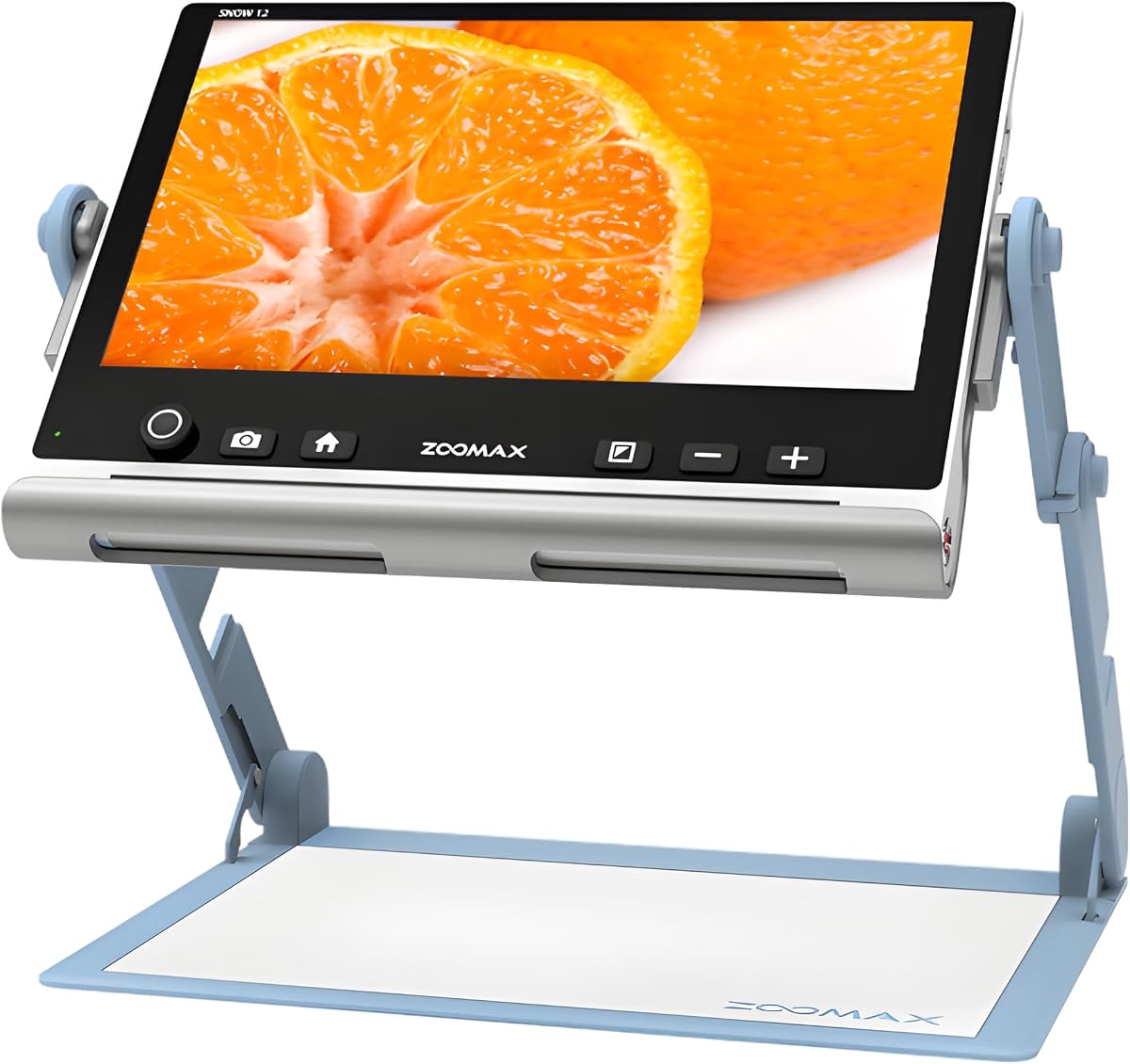
The Zoomax Snow 12 offers a premium experience with its 12 inch HD display and advanced OCR technology. This allows users to convert printed text into speech in over twenty languages, providing a level of independence that goes beyond simple visual magnification.
We may earn a commission when you buy through this link, at no additional cost to you.
Despite its larger screen, the unit is designed to be portable with a foldable stand that ensures stability at any angle. It is particularly useful for users with significant vision loss who rely on text to speech to access written information. The HD camera ensures sharp capture of documents.
The high price reflects the sophisticated features and build quality. While it may require some time to learn the OCR functions, the ability to listen to text is invaluable for those who struggle with even magnified print. It is a comprehensive tool for reading and productivity.
We recommend this model for users who need more than visual aids. If text to speech and a large display are critical for your daily tasks, this device delivers exceptional value.
OCR technology transforms printed text into spoken words, helping users with severe vision loss access written content independently.
Support for over twenty languages makes this magnifier useful for bilingual households or travelers needing to read foreign text.
We may earn a commission when you buy through this link, at no additional cost to you.
This Eyoyo model strikes a balance between performance and ease of use. With a 5 inch screen and zoom up to 32X, it handles most daily reading needs effectively. The strong battery life means you can use it for longer sessions without worrying about recharging.
We may earn a commission when you buy through this link, at no additional cost to you.
You can personalize the view with 17 color modes and save your preferences for quick access later. The foldable handle adds stability and comfort, while the AV output allows for a larger display when needed. It supports photo capture which is useful for reviewing important documents.
While it lacks advanced OCR or voice features, it remains a dependable tool for magnification. Its build quality and functional design make it a solid choice for users seeking reliability without excessive complexity.
Choose this model for its balanced features and long battery life. It is well suited for regular home use and travel where portability and performance are both important.
The high capacity battery allows for extended reading sessions without frequent recharging, improving convenience for daily use.
Capture important images to review later, ensuring you do not miss critical details on labels or documents.
We may earn a commission when you buy through this link, at no additional cost to you.
This portable video magnifier delivers solid performance with a 5 inch screen and extensive color customization. It is designed to make reading easier for those with macular degeneration or other low vision conditions by providing a bright and adjustable display.
We may earn a commission when you buy through this link, at no additional cost to you.
The 26 color modes allow you to tailor contrast to your vision needs, which is a significant advantage for users who struggle with standard white on black displays. The handle and bracket design help maintain steady positioning on pages for smoother reading.
While it does not include advanced features like OCR, its core magnification features work reliably. The ability to save preferred settings means you can focus on reading rather than adjusting controls. It is a practical solution for those prioritizing visual clarity.
We recommend this for users who need a dependable magnifier for daily tasks. It balances ease of use with effective visual aid capabilities.
With 26 modes, you can reduce eye strain and find the best contrast for your specific visual requirements.
The foldable handle provides stability and reduces hand fatigue during long reading sessions.
We may earn a commission when you buy through this link, at no additional cost to you.
The Eschenbach SmartLux is a premium handheld option known for its high quality optics and lightweight design. It offers magnification up to 12X which is ideal for tasks that do not require extreme zoom. Its compact size makes it easy to carry in a pocket or purse.
We may earn a commission when you buy through this link, at no additional cost to you.
You can choose from five viewing modes to adjust contrast and brightness. The ability to capture images is a convenient feature for documenting items or text. It comes with a cleaning cloth to maintain the lens clarity over time.
While its zoom range is lower than some competitors, the clarity and portability make it a favorite for many. It suits users who prefer a simple, handheld device over bulkier video magnifiers for on the go use.
Choose this model if you prioritize portability and optical clarity. It is an excellent companion for quick checks or travel where space is limited.
The compact design allows you to carry it easily in a pocket or bag, making it ideal for travel or daily errands.
High quality optics ensure clear and sharp images, reducing blur and distortion during use.
We may earn a commission when you buy through this link, at no additional cost to you.
This magnifier offers an impressive zoom range from 3X to 48X, allowing users to see extreme details in text or objects. It is designed for users who need powerful magnification to read small print that standard devices cannot handle effectively.
We may earn a commission when you buy through this link, at no additional cost to you.
The simplified button layout ensures that the complex zoom settings are easy to navigate. You can save preferred settings so adjustments are minimized. It connects to a TV via AV output for a larger view, which can be helpful for detailed tasks.
While the higher zoom can introduce some distortion at maximum levels, the flexibility it offers is valuable for specific needs. It provides a robust solution for those who require significant enlargement for daily tasks.
Recommend this model for users needing high power zoom. It is a strong tool for reading very small text where lower zoom magnifiers fall short.
Up to 48X zoom allows you to read extremely small text that standard magnifiers cannot enlarge sufficiently.
Easy to use buttons make managing high zoom settings accessible for all users.
We may earn a commission when you buy through this link, at no additional cost to you.
Selecting the right device depends on your specific vision needs, budget, and how you plan to use it. Consider the following factors to find a model that enhances your independence and comfort.
The magnification range determines how much you can enlarge text or images. Devices typically offer zoom levels from 2X to 50X or more. If you need to read very small print like medicine labels, a higher zoom like 30X or above is essential. However, higher magnification often narrows your field of view, so balance power with usability.
Choose a range that matches your daily tasks. For general reading, moderate zoom is sufficient, while detailed work may require extreme magnification capabilities.
Screen size affects how comfortable reading is. A 5 inch screen is a good balance for portability and viewing. Larger screens like 12 inches provide more clarity but add weight. Resolution is equally important as sharper displays reduce eye strain and keep text crisp at high zoom levels.
Opt for a screen size you can hold comfortably and a resolution that keeps text sharp. HD displays are generally preferred for better clarity.
Different vision impairments respond better to specific color combinations. Look for devices with multiple color modes such as yellow on black or white on blue. These options help maximize contrast and reduce glare for you or sensitive eyes.
Ensure the device offers enough color options to match your preferences. Adjustability here can make a huge difference in readability.
If you plan to use the magnifier while traveling or at work, weight and size matter. Handheld models are lighter but may have shorter battery life. Desktop models offer stability but are less portable. Check the dimensions and weight to ensure it fits your lifestyle.
Choose a weight that you can hold without fatigue. Portable devices should be lightweight enough to carry in a bag.
Rechargeable batteries are standard, but duration varies. Some models offer four hours while others last longer. Consider how long you typically use the device at a time. If you need all day use, look for higher capacity batteries or easy charging options.
Verify battery specs before buying. Long lasting power ensures uninterrupted use during critical tasks.
Some magnifiers offer AV or HDMI outputs to connect to TVs or monitors. This feature is useful for users who want a larger shared display. It can also help reduce strain by allowing you to view content on a bigger screen.
Check if external output options match your needs. This feature adds versatility for home use.
Simple interfaces are vital for seniors or those with dexterity issues. Look for simplified buttons and clear menus. Devices that remember settings save you from adjusting them every time you use the magnifier.
Prioritize models with intuitive controls. A user friendly design reduces frustration and improves accessibility.
Prices vary widely from budget models to premium devices. Determine your budget but also consider the value offered by features like OCR or high zoom. A good warranty can protect your investment against manufacturing defects.
Compare features against cost to find the best value. Ensure the seller offers reliable support if issues arise.
To start, charge the device fully and turn it on. Place it directly over the text you want to read. Adjust the distance between the device and the object to achieve the clearest focus. Use the buttons to zoom in or out until the text is comfortably large.
Experiment with the color modes to find the one that reduces eye strain. If the device has memory features, save your preferred settings so you do not have to readjust them next time. When using the handle, hold it steadily or place it on a stand for consistent focus.
To care for the magnifier, keep the camera lens clean with a soft cloth. Store it in a protective case to prevent scratches. Charge the battery regularly and avoid using the device in extreme temperatures. Proper maintenance ensures it lasts longer and continues to perform well.
The right magnification depends on your specific vision loss. For standard reading like menus, 5X to 10X is often enough. If you have macular degeneration or need to read tiny labels, look for devices offering 30X or higher zoom levels to ensure text is large enough to read comfortably.
Yes, most modern digital magnifiers are designed for extended use. However, the ergonomic handle and stable stand features help reduce hand and neck strain. If you plan to read for hours, choose a model with a memory function to save settings and a comfortable design.
Basic models focus on visual magnification and do not translate text. However, premium devices with OCR and text to speech features often support multiple languages. If you read in more than one language, look for models that explicitly mention multilingual support.
Handheld models are portable and easier to carry but require steady hands to use. Desktop models often have fixed stands and larger screens, offering more stability. Choose handheld for travel and desktop for home use where portability is less critical.
Many models come with AV or HDMI outputs that allow you to connect to a TV. This is useful if you prefer a larger screen for reading or want to share content with others. Check the product specs to ensure it includes the necessary ports.
Use a soft microfiber cloth to wipe the lens and screen gently. Avoid using harsh chemicals or paper towels that could scratch the surface. Some kits come with cleaning cloths. Store the device in a case when not in use to keep it free of dust.
No, most digital magnifiers function as standalone devices without needing a computer. They have built-in systems to display magnified images. Some advanced features like OCR might process text internally without external software. Always check the setup requirements before purchasing.
Some vision care plans or health insurance policies may cover digital magnifiers with a prescription. Coverage varies widely so contact your provider before buying. Keep receipts and documentation from doctors to support any claims you might file for reimbursement.
Our top picks highlight the diversity available in the current market. The Eyoyo 3.5 offers great value for budget conscious users, while the Portable Digital Video Magnifier stands out for its overall balance of features and comfort. For premium needs, the Zoomax Snow 12 delivers advanced capabilities like OCR and large screen viewing.
When choosing, prioritize the features that matter most to your daily routine. If ease of use is critical, look for simplified buttons and memory functions. If high zoom is your goal, ensure the device maintains clarity at maximum levels. Consider portability if you plan to travel with your magnifier.
Prices and availability fluctuate so always check current offers before buying. These devices are powerful tools that can restore independence and confidence. Invest in one that fits your specific needs to make reading and daily tasks more manageable and enjoyable.