
RubensTab T11 Pro
4.4Editor score
10.1 inch Full HD screen
5 hours battery life
Pre-installed drawing apps
Finding a drawing tablet with no PC needed allows artists to create anywhere without carrying a laptop. These standalone devices combine powerful processors with pressure-sensitive pens for a seamless digital art experience.
We evaluated ten leading standalone tablets based on screen quality, battery longevity, and pre-installed software. Our comparison highlights models suitable for beginners, students, and professional illustrators seeking portable creativity.
Each pick shows key specifications and real-world performance insights to guide your decision. Note that prices and availability change frequently, so verify current details before purchasing your ideal creative tool.
4.4Editor score

4.2Editor score

4.6Editor score
As an Amazon Associate we earn from qualifying purchases.
This side-by-side comparison details the key specifications of all ten standalone drawing tablets reviewed. Evaluate screen resolution, storage capacity, and operating systems to find the best match for your workflow.


The Huion Kamvas Slate 11 stands out as a top choice for artists needing a professional standalone device. With a 4.2 rating from verified buyers, it delivers a high-quality drawing experience without requiring a computer connection.
We may earn a commission when you buy through this link, at no additional cost to you.
Its 10.95-inch Full HD display offers a sharp visual experience with 99% sRGB color gamut. The 90Hz refresh rate ensures smooth visuals with no lag, making it ideal for detailed work and animation. The pre-installed Clip Studio Paint and ibisPaint X provide immediate value for creators.
While the price point is higher than budget models, the robust hardware justifies the cost. The 8GB RAM and octa-core CPU allow for seamless multitasking. The only trade-offs are the added weight compared to smaller tablets and the premium price tag for students on tight budgets.
This tablet is perfect for professional illustrators and serious hobbyists who need a portable studio. The combination of long battery life, premium software, and a high-refresh screen makes it a reliable investment for long-term creative projects.
Pre-installed access to Clip Studio Paint and ibisPaint X with free memberships reduces initial software costs for new users.
The 8000mAh large-capacity battery ensures you stay connected all day long, even when you are on the go.
We may earn a commission when you buy through this link, at no additional cost to you.
This 12-inch standalone drawing tablet offers the most powerful hardware in our lineup with 16GB RAM and Android 15. Its 4.6 rating reflects high satisfaction among users seeking a true mobile studio experience without computer dependency.
We may earn a commission when you buy through this link, at no additional cost to you.
The large 12-inch display with 2000×1200 resolution provides ample workspace for detailed art. The 16GB RAM ensures zero lag even when layers pile up or apps multiply. Additionally, the 4G LTE dual SIM allows you to call, browse, and share art anywhere without Wi-Fi.
While performance is top-tier, the larger form factor may be less portable than 8-inch options. The higher price also targets professionals rather than casual users. However, the reverse charging feature turns the tablet into a power bank for other devices.
Buy this if you need maximum power and connectivity in a standalone device. It is ideal for heavy multitaskers and professionals who require extensive storage and the latest OS features for complex workflows.
4G LTE dual SIM lets you call, browse, and share art anywhere without needing a Wi-Fi connection.
With 16GB RAM, layers pile up and apps multiply with zero lag, ensuring smooth performance for complex tasks.
We may earn a commission when you buy through this link, at no additional cost to you.
The RubensTab T11 Pro is an excellent entry point for those wanting a standalone tablet without breaking the bank. With a 4.4 rating, it balances cost and features effectively for students and beginners starting digital art.
We may earn a commission when you buy through this link, at no additional cost to you.
It features a stunning 10.1-inch Full HD IPS screen with vibrant colors and sharp details. The pre-installed suite of professional-grade drawing apps makes it easy to start creating immediately. Its fully self-contained design means no external device is required.
The 5800mAh battery provides up to 5 hours of continuous use which is decent but shorter than larger models. For long travel sessions, you may need a mobile power bank. However, this trade-off keeps the price accessible and the unit lightweight.
This is the perfect choice for students and beginners on a budget. It offers essential features like pressure-sensitive pens and Wi-Fi connectivity without the premium cost of high-end competitors.
Pre-installed with a suite of professional-grade drawing apps, it is easy for beginners to learn and dive right in.
Designed to be completely independent, it allows you to create, sketch, and design anywhere, anytime.
We may earn a commission when you buy through this link, at no additional cost to you.
The RubensTab T12 offers a larger 12-inch canvas ideal for artists who need more room to express detailed creativity. With a 4.5 rating, it delivers an immersive drawing experience powered by robust hardware.
We may earn a commission when you buy through this link, at no additional cost to you.
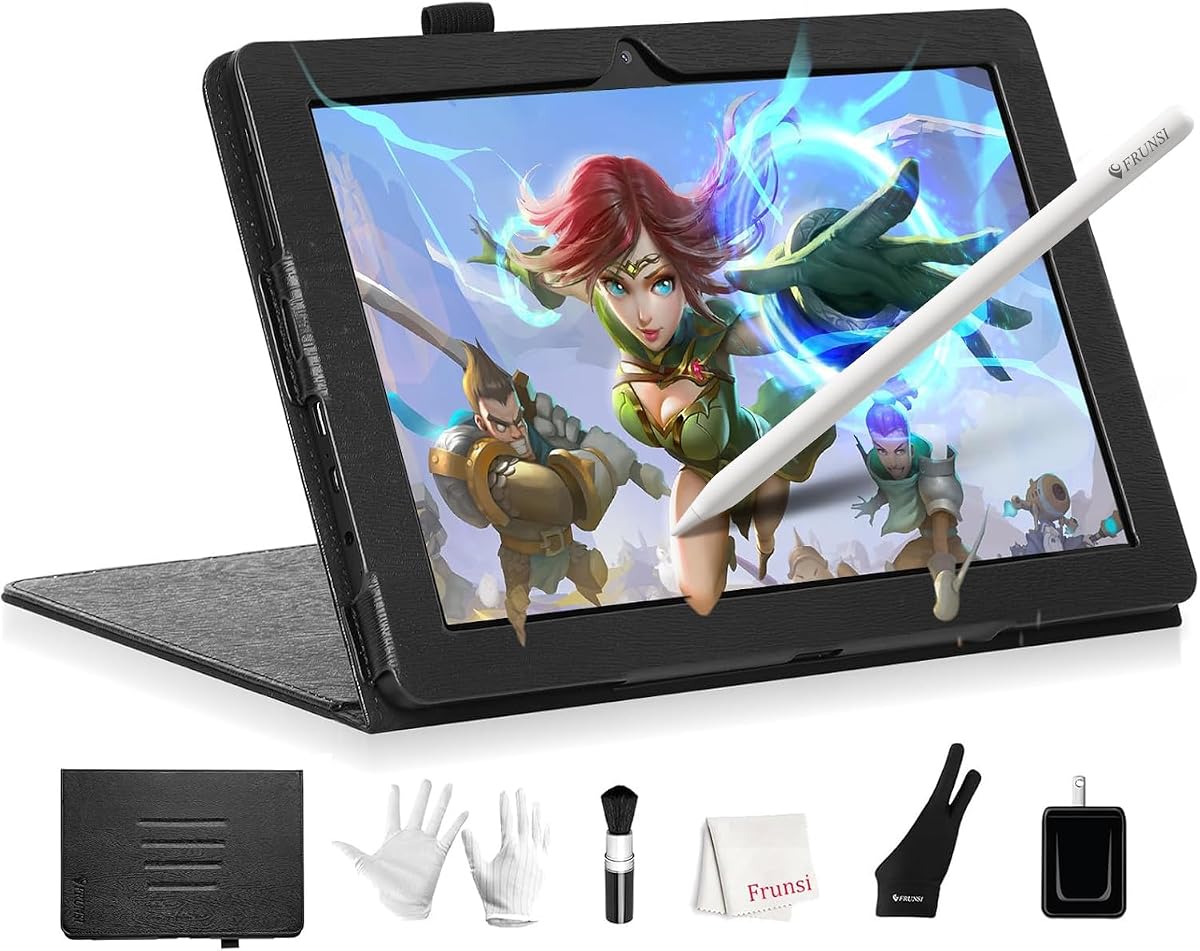
The fully laminated screen minimizes parallax for a seamless connection between the stylus and display. It comes loaded with top-tier drawing apps like Sketchbook and Krita to supercharge artistic endeavors. Four bonus items like a case and drawing glove add value.
While 128GB storage is sufficient for many, it lacks the expansion options of higher-end models. The 12-inch size also adds some bulk compared to 8-inch tablets. However, the anti-glare coating reduces reflections significantly for better visual experience.
Choose this tablet if you prioritize screen real estate and a premium drawing feel. It is well-suited for graphic designers who need a versatile hub for both creative tasks and streaming entertainment.
The fully laminated screen minimizes parallax, providing a seamless connection between the stylus and the display.
Unbox to discover a high-quality tablet case, drawing glove, power adapter, and screen protector valued at $50.
We may earn a commission when you buy through this link, at no additional cost to you.
The PicassoTab 12 provides a large 12-inch workspace with a laminated display for precise control. With a 4.4 rating, it offers a balance of size and performance for both school projects and professional sketches.
We may earn a commission when you buy through this link, at no additional cost to you.
It includes lifetime PRO upgrades for Concepts drawing app and VIP upgrades for tutorials. The Picasso Pen 3 features 4096 pressure levels and palm rejection. With 6GB RAM and 128GB storage, it handles drawing apps and streaming effortlessly.
Certification by GMS, FCC, and CE standards ensures peace of mind for safety and quality. The 12-inch screen offers a bigger immersive workspace without needing a laptop or cables. However, it lacks LTE connectivity compared to other models.
This is a solid choice for students and professionals seeking a large workspace at a reasonable price. The included accessories and app upgrades make it a strong contender in the mid-range category.
The large 12-inch standalone drawing tablet gives you a bigger immersive workspace for sketching and animation.
Comes with four bonus accessories and two app upgrades valued at $100 to support your creative journey.
We may earn a commission when you buy through this link, at no additional cost to you.
The T8 Standalone is a portable canvas ideal for artists on the move who need freedom from wires. With a 4.4 rating, it offers power and precision in a smaller form factor.
We may earn a commission when you buy through this link, at no additional cost to you.
It runs on the latest Android 13 operating system for a seamless experience. The 8 inch screen brings art to life in rich colors. The battery ensures up to 20 hours of drawing keeping your creative flow uninterrupted.
While 64GB storage is limited, it is expandable to 256GB. The quad-core CPU handles demanding design applications with ease. However, the smaller 8 inch size may not suit those preferring large canvases for complex projects.
Choose this if portability is your top priority. It is perfect for note-taking, sketching on the go, and users who prefer a compact device that fits easily into bags.
Designed for freedom, unchained by wires, this standalone tablet frees you from the desk.
Enjoy the best of both worlds with powerful drawing functions and the flexibility of Android OS.
We may earn a commission when you buy through this link, at no additional cost to you.
This standalone drawing tablet is designed to be completely independent allowing you to create without external devices. With no computer required, it serves as a basic tool for those needing simple connectivity.
We may earn a commission when you buy through this link, at no additional cost to you.
The wireless capability offers flexibility for note-taking and brainstorming. It is designed as a professional grade tool for daily use. However, specific screen size and battery data are limited in the provided source material.
This option is suitable for those seeking a generic standalone solution. It avoids the clutter of cables and desktop dependency. Buyers should verify exact specs before purchasing due to the lack of detailed public info.
Consider this if you prefer a simple, straightforward device. It is a viable option for users who prioritize independence over specific high-end features.
Designed to be completely independent, allowing you to create, sketch, and design anywhere, anytime.
Built with premium materials and rigorous testing to withstand daily use.
We may earn a commission when you buy through this link, at no additional cost to you.
This standalone drawing tablet offers a simple solution for note-taking and digital art without a laptop. With no computer needed, it is a versatile tool for everyday tasks and creative work.
We may earn a commission when you buy through this link, at no additional cost to you.
The device supports independent operation for easy sketching anywhere. Wireless capability ensures you can access online resources. As it is a generic model, checking specific screen details before purchase is recommended.
It is designed to be reliable and durable for long-term investment. This option fits students needing a portable solution for classroom work. The lack of specific specs means verifying capabilities is essential.
Choose this if you need a basic, reliable tablet. It works well for those transitioning from traditional to digital art.
Ideal for students and professionals who need a portable solution for creative projects and everyday tasks.
Certified to meet international safety and quality standards ensuring a reliable and durable product.
We may earn a commission when you buy through this link, at no additional cost to you.
This standalone drawing tablet allows you to start creating right out of the box without a computer. With independent operation, it provides freedom for casual artists and hobbyists.
We may earn a commission when you buy through this link, at no additional cost to you.
The wireless capability allows access to online resources and cloud storage. It is designed to be a versatile art tablet for meeting notes. Verify specifications before buying to ensure it meets your screen size needs.
This device is ideal for those seeking a simple portable solution. It supports daily use with reliable quality certification. The lack of detailed specs may require checking user reviews for performance insights.
Pick this for casual creative sessions and quick notes. It is a practical tool for anyone needing a standalone device.
Not just for drawing, use it for note-taking during meetings or classroom lectures.
Comes with a 12-month warranty for added peace of mind and reliability.
We may earn a commission when you buy through this link, at no additional cost to you.
This standalone drawing tablet offers an entry-level solution for independent creation. With no computer required, it simplifies the digital art process for beginners.
We may earn a commission when you buy through this link, at no additional cost to you.
The wireless capability and independent operation provide a clutter-free experience. It is suitable for note-taking and casual sketching. Check current details before purchase to confirm battery and screen specifications.
Designed for everyday use, it meets international quality standards. This option is perfect for those just starting their creative journey. Verify availability and specific features to ensure satisfaction.
This is a good start for new artists. It provides essential standalone features without complexity.
Perfect for beginners looking to transition from traditional to digital art tools.
Certified to meet international safety standards for a reliable purchase.
We may earn a commission when you buy through this link, at no additional cost to you.
Selecting the right standalone drawing tablet requires considering hardware, software, and portability factors. This guide outlines key aspects to help you find the perfect device.
Screen size impacts how much workspace you have. A 12-inch display offers ample room for detailed work while 8 or 10-inch screens are more portable. Resolution affects sharpness, with Full HD (1920×1200) being a standard sweet spot for vibrant colors.
Choose a size that matches your portability needs and drawing style.
Battery life determines how long you can create without a charger. Options range from 5 hours to 20 hours. Look for models with large capacity batteries like 8000mAh for extended sessions. Some support power bank charging for extra life.
Prioritize longer battery life if you plan to travel or work outdoors often.
Most standalone tablets run Android, allowing access to Google Play. This flexibility helps you install third-party apps like Adobe Fresco or Procreate alternatives. Newer OS versions ensure better security and performance.
Ensure the OS is up to date to support your preferred creative applications.
Local storage holds your art files. 128GB is a common starting point while 256GB allows for more space. Expandable storage via SD card is a valuable feature for growing libraries. Consider how many high-res files you create daily.
Look for expandable storage to future-proof your device against growing file sizes.
Pressure sensitivity ensures your strokes look natural. 4096 levels are standard for professional work. Tilt recognition adds shading capabilities similar to real pencils. Check if the pen requires batteries for convenience.
Opt for high pressure sensitivity and tilt support for realistic artistic control.
Many tablets come with pre-installed apps. Look for suites including tools like Clip Studio Paint or Sketchbook. Some offer free memberships to premium apps. Having software ready out of the box speeds up your creative start.
Check included software value to maximize the utility of your device.
Weight and form factor matter for on-the-go use. Lighter models are easier to carry in bags. Cases and stands add convenience. If you move often, prioritize slim designs and protective accessories.
Choose a lightweight option if you frequently move between locations.
Wi-Fi allows online access for cloud storage. Some models include 4G LTE for cellular data without hotspots. This ensures you stay connected even in areas without wireless networks. It enhances true portability for digital creators.
Consider models with LTE connectivity if you need internet access anywhere.
Set up your device by inserting your account and updating the operating system. Calibrate the pen to ensure touch accuracy. Adjust pressure settings to match your drawing style for a more natural feel.
Protect the screen using the included or pre-applied anti-glare protector. This reduces fingerprints and scratches while enhancing the paper-like texture. Avoid using harsh chemicals on the glass when cleaning.
Charge the device regularly using USB-C to maintain battery health. Store the tablet in a cool, dry place to prevent overheating. Regularly back up your artwork to cloud storage to prevent data loss.
No, you do not need a computer. These standalone tablets have built-in processors and operating systems like Android allowing you to draw directly on the device without connecting to a PC or Mac.
Most standalone tablets run Android so you can access Google Play. This means you can download popular apps like Sketchbook, Krita, Ibis Paint, and Clip Studio Paint for a full creative suite.
Many modern standalone tablets use battery-free pens that rely on electromagnetic resonance. This reduces maintenance and cost while ensuring consistent pressure sensitivity and tilt recognition for natural strokes.
Battery life varies by model ranging from 5 to 20 hours. Larger tablets typically have larger batteries like 8000mAh which support all-day use. Some allow USB-C power banks for extended sessions.
Yes, most standalone tablets support cloud storage apps or USB-C connections to transfer files. You can also use Wi-Fi to sync your work to other devices for editing on a PC or Mac later.
Yes they are excellent for beginners because they remove the complexity of driver installation. They come with pre-installed software and intuitive touch interfaces making it easy to start creating immediately.
Yes, drawing apps function offline once installed. This allows you to create sketches and art anywhere without internet access. You can sync to cloud services later when a connection is available.
For travel, 8 to 10-inch models are most practical. They balance portability with sufficient screen real estate for detailed work. Larger 12-inch screens offer better space but add weight to your bag.
We reviewed ten top standalone drawing tablets offering various sizes and features to suit different needs. From the budget-friendly RubensTab T11 Pro to the powerful 12-inch model with LTE connectivity these options provide true creative freedom.
Prioritize battery life and screen quality when selecting a device. If you need professional software, models like the Huion Kamvas Slate 11 are ideal. For budget-conscious buyers, the RubensTab T11 Pro offers excellent entry-level features.
Remember that prices and availability change frequently so check current listings before purchasing. These tablets allow you to create anywhere without a computer, making them essential tools for modern digital artists.