
Logitech G305 Lightspeed Wireless Gaming Mouse
4.6Editor score
HERO sensor up to 12000 DPI
Ultra-fast LIGHTSPEED wireless technology
Only 3.4 oz lightweight design
This guide compares the top lightweight mice for gaming and productivity, featuring detailed specs and expert picks to help you choose the perfect ergonomic
Finding the right lightweight mouse can transform your daily computing experience by reducing hand strain and improving precision. Whether you are a gamer needing speed or a professional seeking comfort, a lighter device offers distinct advantages for long sessions.
We have carefully selected ten top-rated models based on performance, build quality, and user feedback. This list covers wireless and wired options across various price points to ensure there is a suitable choice for every type of user and setup.
Each pick highlights key features like sensor accuracy, battery life, and ergonomic design to help you make an informed decision. Please note that prices and availability may change over time, so always verify current details before purchasing your new device.
4.6Editor score

4.5Editor score

4.6Editor score
Explore this detailed side-by-side comparison of the top ten lightweight mice available this month. We analyze key specifications such as sensor type, connectivity, weight, and unique features to help you identify the model that best fits your specific workflow and gaming needs.





The Logitech G305 Lightspeed is a standout choice for budget-conscious gamers seeking a lightweight wireless experience. With a 4.6 rating, it delivers exceptional performance thanks to its HERO sensor and fast connection speed that rivals wired mice.
We may earn a commission when you buy through this link, at no additional cost to you.
Its standout quality is the incredible power efficiency, offering up to 250 hours of continuous gameplay on a single battery. The ultra-fast LIGHTSPEED technology ensures a 1 ms report rate, providing the responsiveness needed for competitive gaming without the weight penalty.
While it uses a standard AA battery rather than being rechargeable, the endurance mode can extend life up to nine months, making battery changes rare. The compact design with built-in nano receiver storage makes it an ideal travel companion for laptop users.
This mouse is perfect for gamers who want high performance without breaking the bank. If you prioritize agility and battery efficiency over flashy features, the G305 is a reliable tool for both daily tasks and intense gaming sessions.
The next-generation optical HERO sensor delivers incredible performance and up to 10 times the power efficiency over previous generations.
Built-in nano receiver storage makes it a great portable desktop mouse and laptop travel companion for playing anywhere.
We may earn a commission when you buy through this link, at no additional cost to you.
The white variant of the Logitech G305 offers the same top-tier performance as its black counterpart with a clean aesthetic. It maintains a 4.6 rating for its ability to deliver speed and precision through advanced wireless technology that eliminates lag.
We may earn a commission when you buy through this link, at no additional cost to you.
Its key strengths include the next-gen HERO sensor which provides unrivaled gaming performance and power efficiency. The mechanical design ensures maximum maneuverability and durability, while the ultra-long battery life supports up to 250 hours of continuous use.
A minor trade-off is the reliance on an AA battery, though this allows for quick swaps if power runs out during long sessions. The classic shape and compact form factor remain ideal for users who prefer a traditional mouse feel in a portable package.
Buyers looking for a stylish yet functional gaming mouse will find this model delivers. It balances weight, speed, and battery life effectively, making it a strong contender for those seeking reliable wireless performance without premium costs.
The LIGHTSPEED wireless gaming mouse delivers super-fast 1 ms response time and performance faster than wired options.
Lightweight mechanical design and classic shape offer maximum maneuverability durability and comfort for extended gaming use.
We may earn a commission when you buy through this link, at no additional cost to you.
The Logitech G PRO X Superlight 2 is an upgrade to a championship-winning icon, engineered to win with advanced features like 8 kHz polling. With a 4.5 rating, it represents the pinnacle of wireless gaming mouse technology for serious players.
We may earn a commission when you buy through this link, at no additional cost to you.
Its key strength is the HERO 2 sensor which tracks over 880 IPS with up to 44000 DPI and zero smoothing. The LIGHTFORCE hybrid switches deliver pro-level precision with tactile clicks, while zero-additive PTFE feet ensure seamless glide across surfaces.
The inclusion of USB-C charging and 95-hour battery life improves convenience, though it lacks the POWERPLAY feature without an additional purchase. These trade-offs are acceptable given the immense performance boost and reduced weight of just 60 grams.
This model is ideal for esports pros or enthusiasts who demand the best. If you want the most advanced sensor and reliable wireless connection to dominate your game, the Superlight 2 is the ultimate tool for success.
HERO 2 tracks over 880 IPS and up to 44000 DPI with zero smoothing acceleration or filtering for pure precision.
LIGHTFORCE hybrid switches deliver pro-level precision and reliability with a tactile click feel for every press.
We may earn a commission when you buy through this link, at no additional cost to you.
The Logitech G PRO X2 SUPERSTRIKE is designed alongside top esports athletes to deliver the fastest customizable click available. With a 4.6 rating, it brings industry-leading speed and haptic feedback for an unmatched immersive gaming experience.
We may earn a commission when you buy through this link, at no additional cost to you.
Its standout quality is the Haptic Inductive Trigger System which gives real-time feedback for any game scenario. The HERO 2 sensor ensures pinpoint accuracy with up to 44000 DPI, and the ultra-durable 0.7 mm thin-wall case reduces weight significantly.
While the price is high, the battery life of 60 to 90 hours and compatibility with POWERPLAY justify the cost for pros. Advanced features require Logitech G HUB Software, which adds some setup complexity but unlocks full customization potential.
Choose this mouse if you want the absolute best in speed and durability. It is built for champions who need every advantage, making it a powerful tool for competitive play on PC or Mac systems.
The Haptic Inductive Trigger System gives real-time feedback for an unmatched immersive experience in any game scenario.
Built with 0.7 mm thin-wall case and large UHMWPE feet for effortless movement and ultra durability.
We may earn a commission when you buy through this link, at no additional cost to you.
The Redragon M612 is a fantastic choice for those who prefer wired reliability on a budget. It scores a 4.6 rating for its ergonomic design and customizable features that enhance both gaming and daily productivity tasks.
We may earn a commission when you buy through this link, at no additional cost to you.
Its key strengths include 5 redefinable DPI levels and 11 programmable buttons that allow for deep customization of keybinds. The skin-friendly frosted coating offers a fingerprint-free tactile feel, while the dynamic RGB backlight adds a vibrant vibe to your setup.
While it lacks wireless freedom, the ergonomic claw-grip design reduces fatigue even after hours of use, making it comfortable for long sessions. The solid frame ensures stability and control, which is a priority for users focused on precision over portability.
Buyers wanting a feature-rich mouse without high costs will appreciate this model. It provides excellent comfort and customization options, making it a great entry point for gamers who want style and function at an affordable price.
11 programmable buttons are all editable with customizable tactical keybinds to suit any game or work need.
Solid frame with streamlined claw-grip design offers a satisfying comfortable experience with less fatigue during long use.
We may earn a commission when you buy through this link, at no additional cost to you.
The Logitech G502 Hero Wired is known for its precision and adaptability to any playing style. With a 4.6 rating, it offers a next-generation HERO sensor and customizable weights that allow users to tailor the feel of their mouse.
We may earn a commission when you buy through this link, at no additional cost to you.
Its standout quality is the ability to match your playing style by arranging up to five 3.6 g weights for a personalized configuration. The mechanical switch button tensioning system provides a crisp clean click feel with rapid feedback for accurate control.
While it can be heavier with weights added, the dual-mode scroll wheel and 11 programmable buttons give fully customizable control over gameplay. The next-gen sensor tracks movements at sub-micron levels, ensuring pinpoint accuracy for every movement.
This mouse is perfect for gamers who love customization and stability. If you want to fine-tune the weight and layout of your device for maximum control, the G502 Hero is a classic choice that delivers high performance.
Arrange up to five 3.6 g weights for a personalized weight and balance configuration that matches your style.
Metal spring tensioning system and metal pivot hinges provide a crisp clean click feel with rapid feedback.
We may earn a commission when you buy through this link, at no additional cost to you.
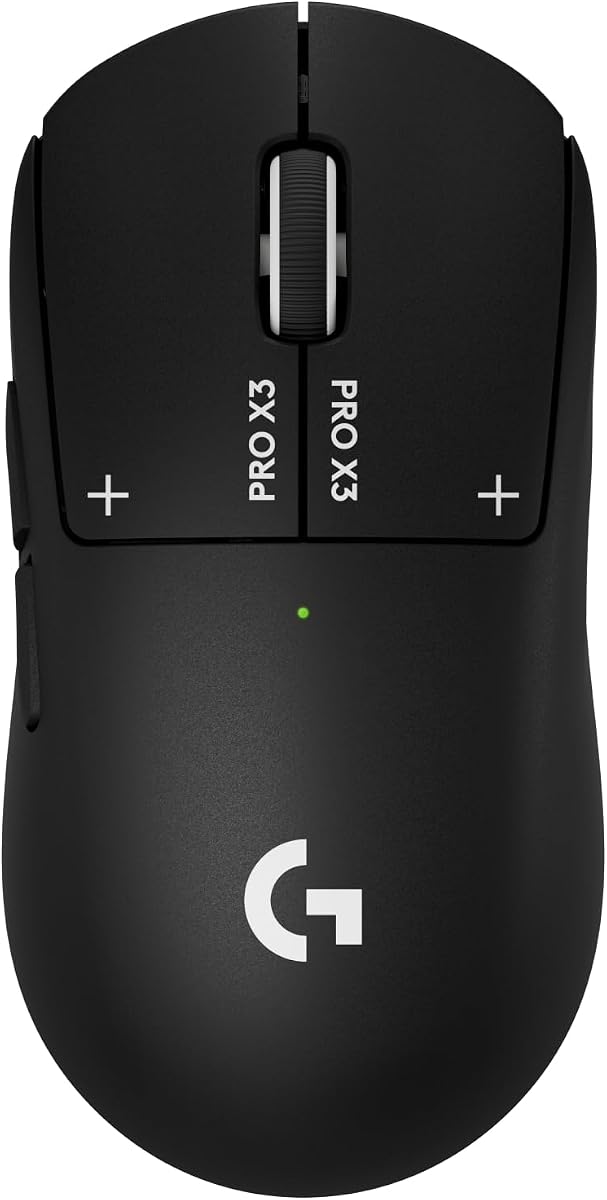
The Logitech G PRO X3 SUPERSTRIKE brings true click innovation with an electromagnetic field that replaces standard switches. It has a 4.3 rating for its ability to deliver the fastest and most customizable click on the market today.
We may earn a commission when you buy through this link, at no additional cost to you.
Its key strengths include the HERO 2 sensor that tracks over 930 IPS with up to 48000 DPI for high-stakes matches. The LIGHTSPEED wireless technology operates at up to 8 kHz polling to ensure zero lag and a highly responsive connection.
The haptic inductive trigger system allows for 10 actuation points and 5 reset points, giving programmable control that standard mice lack. Battery life is impressive at up to 135 hours, and the thin-wall case ensures smooth movement during marathon sessions.
This model is ideal for advanced users who want maximum customization. If you seek true click innovation and top-tier tracking precision, the X3 SUPERSTRIKE offers features that set it apart from standard gaming mice.
Haptic Inductive Trigger system replaces standard switches with an electromagnetic field for unique actuation points.
LIGHTSPEED wireless technology operates at up to 8 kHz polling for a highly responsive tournament-grade connection.
We may earn a commission when you buy through this link, at no additional cost to you.
The Logitech M185 Compact is designed for comfort and reliability in office or travel environments. It holds a 4.4 rating for its ambidextrous shape and strong wireless connection that works on almost any surface or computer system.
We may earn a commission when you buy through this link, at no additional cost to you.
Its standout quality is the durable reliable build that offers up to 1 year of battery life thanks to smart sleep mode. The tiny nano receiver stays in your computer for plug and play simplicity without needing extra software setup.
While it lacks gaming features, the compact size makes it suitable for small workspaces or laptops. It is made with certified post consumer recycled plastic, showing an eco-friendly approach to manufacturing common office peripherals for daily use.
Buyers looking for a simple reliable mouse for work will love this model. It outperforms touchpads by 30% in speed, making it a practical choice for increasing productivity during daily tasks and meetings.
Smart sleep mode function provides up to 1 year of battery life with an included AA battery.
Plastic parts include certified post consumer recycled plastic for a more sustainable product design.
We may earn a commission when you buy through this link, at no additional cost to you.
The Logitech M330 Silent Plus is perfect for quiet offices or shared spaces where noise matters. It has a 4.5 rating for its SilentTouch Technology which reduces clicking sounds by over 90 percent while maintaining top performance.
We may earn a commission when you buy through this link, at no additional cost to you.
Its key strengths include a naturally shaped contoured design built for long-lasting comfort and functionality for right-handed users. The 18-month battery life and auto-sleep mode let you focus on work without frequent battery changes or interruptions.
While it is designed for productivity rather than gaming, the wireless range of up to 33 ft offers flexibility in placement. Advanced optical tracking provides smart cursor control on most surfaces, making navigation smooth and efficient.
Choose this mouse if you value a quiet working environment. Its ergonomic grip and long battery life make it an excellent tool for professionals who need reliable silent input for daily computing tasks.
SilentTouch Technology reduces over 90 percent of clicking sounds to ensure top performance in a quieter environment.
The 18-month battery life and auto-sleep mode allow focus on work without hassle of changing batteries.
We may earn a commission when you buy through this link, at no additional cost to you.
The Logitech MX Master 4 redefines productivity with haptic feedback and advanced ergonomic design. With a 4.2 rating, it focuses on flow and comfort for creative professionals needing precision in daily workflows and software management.
We may earn a commission when you buy through this link, at no additional cost to you.
Its standout quality is the Haptic Sense Panel which provides customizable feedback on specific actions or shortcuts to enhance productivity. The Actions Ring adapts to each app, placing filters and adjustments at your cursor for intuitive control.
While it is a premium product, the MagSpeed scroll wheel and 2X powerful connectivity ensure faster stronger performance. Quiet clicks reduce distractions, and the natural tilt reduces hand stress making fluid navigation easier for long creative sessions.
Buyers wanting top-tier ergonomics and smart features will find value here. The included Adobe subscription adds extra value, making this mouse a powerful investment for designers and creators who rely on efficient daily workflows.
Customizable haptic feedback on specific actions shortcuts and notifications enhances productivity on this wireless Bluetooth mouse.
Ergonomic mouse designed for comfort keeps you in flow with natural tilt intuitive buttons reducing hand stress.
We may earn a commission when you buy through this link, at no additional cost to you.
Selecting the right lightweight mouse involves understanding your specific needs for performance, ergonomics, and connectivity. This guide breaks down key factors to help you narrow down options efficiently.
Weight is a critical factor for a lightweight mouse as it directly impacts fatigue and maneuverability during long sessions. Generally models between 60g and 80g are ideal for gaming whereas office users might prefer slightly heavier ergonomic shapes for stability. Look for designs that distribute balance well so that the mouse feels natural in your grip without being too light to control.
Prioritize weight distribution over just a low number to ensure comfort and precision.
A high-quality sensor is essential for tracking accuracy and responsiveness especially in gaming or precision work. Look for sensors like the HERO series or PixArt which offer zero smoothing or acceleration for raw performance. Higher DPI options allow for customization across different screen resolutions without losing sensitivity.
Choose a sensor with zero smoothing to ensure your cursor moves exactly as intended.
Wireless mice offer freedom from cable drag which is vital for lightweight gaming performance but ensure the connection is stable. Wired options provide zero latency and no battery concerns but limit movement range. Decide based on your preference for freedom versus absolute connection security.
Wireless is better for speed and cable management but wired ensures zero power worries.
For wireless models, battery life determines how often you must recharge or change cells. Some models offer hundreds of hours on a single charge while others use AA batteries for quick swaps. Consider your usage frequency to decide between rechargeable and replaceable options.
Look for models offering over 50 hours of use to minimize charging interruptions.
An ergonomic shape ensures your hand rests comfortably without strain which is crucial for long-term health. Ambidextrous shapes fit both hands but might lack support whereas right-handed curves offer better palm rest. Match the shape to your hand size and grip style.
Prioritize a shape that supports your natural grip to prevent wrist pain over time.
Programmable buttons add versatility for shortcuts and macro commands which can improve workflow efficiency. More buttons allow for complex setups but might clutter the design. Choose a model that offers enough keys for your needs without making the device bulky.
Select a mouse with at least 5 programmable buttons to enhance daily productivity.
PTFE feet affect how smoothly the mouse moves on your surface and can impact speed and control. Look for models with pure PTFE or specialized coatings for a frictionless glide. Quality feet also ensure durability over time.
Choose mice with high-quality PTFE feet for smooth effortless movement.
Durable materials and sturdy switches are important since lightweight mice still need to withstand daily use. Thin cases might reduce weight but ensure they are robust enough not to flex during clicks. Read reviews regarding durability to avoid fragile models.
Ensure the mouse is built with durable materials despite its light weight.
Start by adjusting DPI settings using software or buttons on the mouse to find a speed that feels natural. This ensures precise cursor control without excessive hand movement or strain.
Keep the sensor surface clean by regularly wiping the bottom of the mouse with a dry cloth. Dust accumulation can interfere with tracking accuracy and cause jittery movement during use.
Store the mouse in a safe dry place when not in use to prevent physical damage. For wireless models charge fully before extended storage to maintain battery health and extend its lifespan.
A lightweight mouse reduces the force needed to move it which lowers hand fatigue and improves reaction times. This allows for faster flicks and smoother tracking during high-speed gameplay where every millisecond counts for victory.
Modern wireless mice using advanced technology like LIGHTSPEED have virtually no lag compared to wired options. They offer 1 ms response times which match or exceed wired performance for most competitive gaming needs.
Gently wipe the sensor on the bottom of the mouse with a dry soft cloth or a clean dry toothbrush. Ensure no liquids touch the sensor to avoid damage and keep it free from dust that causes tracking issues.
Yes many lightweight mice are built with durable materials to withstand daily office use. Switch ratings and chassis quality vary so choose models with reputable durability records for long-term reliability.
Most modern optical sensors work on almost any surface including wood or desks without a mousepad. However using a cloth mousepad can improve consistency and glide performance for better accuracy.
Average battery life varies from 30 hours for heavy gaming mice to over 200 hours for efficiency-focused models. Rechargeable options often last longer per charge but may take time to replenish power fully.
Yes a lightweight mouse can reduce strain during long typing and navigation sessions at work. Models designed for ergonomics help maintain comfort and productivity without the weight causing fatigue.
Many lightweight mice have dedicated DPI buttons on top or software suites to adjust sensitivity levels. Check the manual to locate these buttons or download official software for precise configuration.
In summary the top picks range from budget wireless options to premium haptic designs catering to different user needs. Each model offers distinct advantages in sensor performance and comfort that justify its place on this list.
Prioritize your specific use case whether it is competitive gaming precision productivity or travel comfort. A lightweight mouse should feel like an extension of your hand rather than a burden during use.
Remember that prices and availability change frequently so always check current listings before buying. We hope this guide helps you find the perfect lightweight mouse to upgrade your daily computing experience.