
Omada Gigabit SFP to RJ45 Media Converter
4.7Editor score
Hot-Swappable FX Port
Auto-Negotiation Support
Single or Multi Mode
This guide compares ten top-rated Ethernet Fiber Media Converters for extending network range. We evaluate speed, fiber types, and reliability to help you
Ethernet Fiber Media Converters bridge the gap between copper and fiber networks. They allow you to extend connectivity over long distances without signal loss or interference. Choosing the right unit ensures stable performance for your infrastructure.
We compared ten leading models based on speed, compatibility, and build quality. Each product offers unique features like SFP slots or pre-installed modules. Our analysis highlights the strengths and trade-offs of every option.
Each pick shows key specs and real-world performance traits. Prices vary by retailer and stock. Check current listings before purchasing to ensure you get the best value for your specific networking needs.
4.7Editor score
4.7Editor score

5.0Editor score
The following table provides a side-by-side comparison of all ten Ethernet Fiber Media Converters. Use this to quickly identify key differences in speed, fiber type, and included modules.


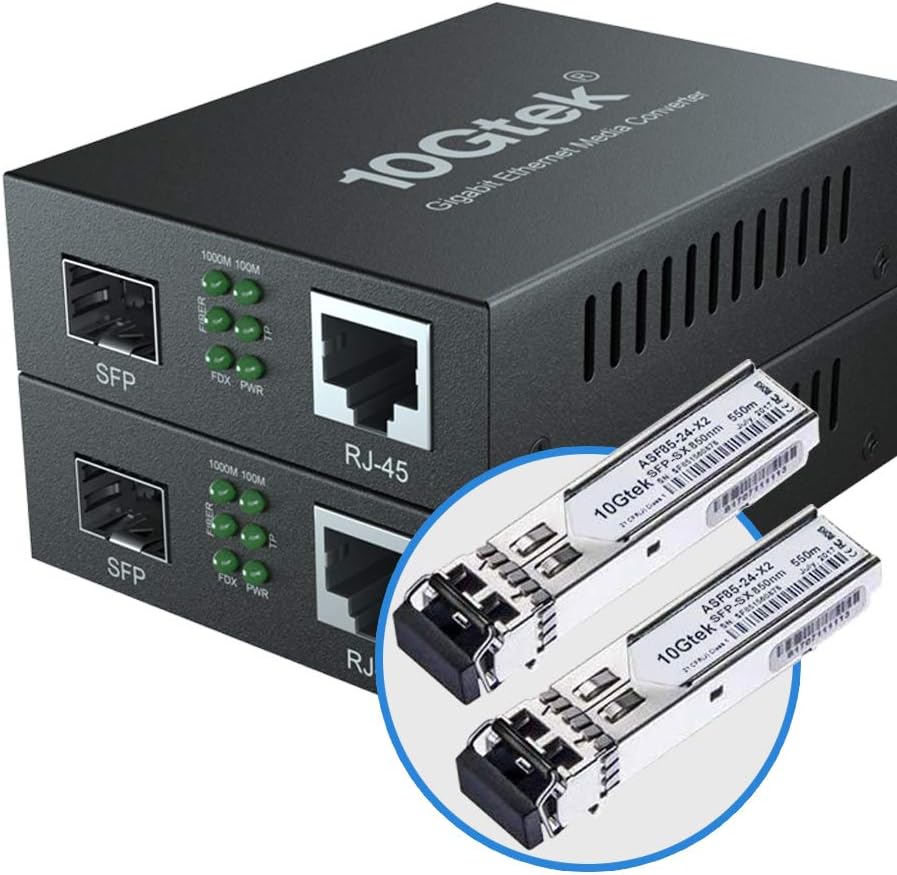
This 10Gtek unit is a top-rated Ethernet Fiber Media Converter designed for Gigabit speeds. It includes a pair of multimode SFP modules ready for immediate use. The UL-certified power supply adds a layer of safety and reliability.
We may earn a commission when you buy through this link, at no additional cost to you.
Its standout quality is the inclusion of dual LC fiber ports alongside standard RJ45. The auto-negotiation on the copper side ensures compatibility with various devices. You can connect switches or cameras without manual configuration.
The main trade-off is the distance limit of 550 meters. This suits most office environments but not long campus links. Still, the price and included modules make it a strong contender.
It is ideal for IT admins needing a quick setup. The pack of two allows bidirectional links. We recommend it for indoor or near-building fiber runs.
No software is needed to start using this media converter. Simply connect the fiber and power, and the LEDs confirm the link state.
The dual LC ports work with standard multimode duplex cables. This makes it easy to integrate with existing structured cabling systems.
We may earn a commission when you buy through this link, at no additional cost to you.
The Omada MC220L is a budget-friendly Ethernet Fiber Media Converter that prioritizes flexibility. It uses a hot-swappable SFP port so you can choose the right transceiver for your needs. This adaptability saves money over time.
We may earn a commission when you buy through this link, at no additional cost to you.
Key strengths include auto-negotiation and compatibility with both single-mode and multi-mode SFPs. The RJ45 port handles 10/100/1000 Mbps automatically. It is easy to install in any network environment.
A note that the SFP module must be purchased separately. This adds to the cost but allows customization. The build is functional but not heavy-duty.
Choose this if you need a low-cost bridge between copper and fiber. It works well for extending network segments without breaking the bank.
You can swap the SFP module to change fiber type or distance. This future-proofs your investment as network needs change.
The copper port detects speed and duplex automatically. You do not need to set switches manually on the connected device.
We may earn a commission when you buy through this link, at no additional cost to you.
This pair of converters uses BiDi SFP modules to transmit and receive over a single fiber strand. It includes the transceivers needed for immediate use. The wide voltage supply makes it useful globally.
We may earn a commission when you buy through this link, at no additional cost to you.
Key strengths are jumbo frame support and status LEDs. You can monitor the link easily and handle larger data packets. The auto-negotiation on RJ45 simplifies connections.
The trade-off is the specialized BiDi requirement. You must match the BiDi modules on both ends. This adds complexity compared to standard duplex setups.
It is great for saving fiber strands in dense cabling. Choose it when you need bidirectional transmission on existing single-fiber runs.
BiDi technology lets you use one strand for both directions. This halves the fiber needed for each link connection.
The 9K-byte jumbo frame support improves throughput. This is helpful for storage or backup traffic over the link.
We may earn a commission when you buy through this link, at no additional cost to you.
This 10G Ethernet Media Converter handles up to 10 Gigabit speeds. The RJ45 port auto-adapts to 100M through 10G. It also supports SFP+ slots for fiber uplinks.
We may earn a commission when you buy through this link, at no additional cost to you.
Key strengths include the flexible copper port and long warranty. The LED indicators show diagnostic status clearly. This helps troubleshooting in high-speed networks.
The main trade-off is the cost of 10G SFP modules. These are pricier than standard Gigabit transceivers. Ensure your devices support the speeds.
It is perfect for upgrading to 10G without replacing all switches. Buy it for high-throughput server or uplink scenarios.
The RJ45 port handles 100M to 10G automatically. You can connect older devices or newer ones without hassle.
This slot accepts any 10G SFP+ module. This allows you to choose the range and fiber type you need.
We may earn a commission when you buy through this link, at no additional cost to you.
This 10Gtek unit supports Single Mode fiber with a 20km range. It comes with a pair of converters. The SC connectors match standard telecom cabling. This is ideal for campus links.
We may earn a commission when you buy through this link, at no additional cost to you.
Key strengths are the long reach and UL certification. You can connect buildings without repeaters. The power supply is safe for commercial use.
The trade-off is the SC connector type. Ensure your fiber cables match SC. Other setups may need adapters.
Choose this for connecting separate buildings reliably. It is a cost-effective solution for medium-distance fiber runs.
Single mode fiber allows signals to travel further. This is essential for linking different buildings or sites.
The UL certification ensures safe power operation. This reduces fire risks in commercial environments.
We may earn a commission when you buy through this link, at no additional cost to you.
This pair of converters comes ready to link at 20km. It includes the SFP LC modules pre-installed. You save time on configuration. The wide voltage input suits global deployment.
We may earn a commission when you buy through this link, at no additional cost to you.
Key strengths include jumbo frame support and US-based support. The link status LEDs make monitoring easy. Auto-negotiation works seamlessly.
The trade-off is that the SFP modules are built-in. You cannot swap them without effort. Ensure the 20km distance is correct.
Buy it if you need a reliable 20km link. It is great for office parks or industrial sites.
The SFP modules are matched to the unit. This ensures optimal optical performance from the start.
This converter accepts 100V to 240V power. You can use it in different countries without a special transformer.
We may earn a commission when you buy through this link, at no additional cost to you.
This Single Mode LC Gigabit Ethernet Media Converter offers DIP switches for speed control. It includes the LC SFP module and a patch cable. The Link Fault Pass-Through feature enhances network health.
We may earn a commission when you buy through this link, at no additional cost to you.
Key strengths are the DIP switches and included accessories. You can force 100Base-LX or 1000Base-LX easily. Wall mount ears come included.
The trade-off is manual configuration via DIP. You must ensure both ends match. But it offers more control than auto setups.
Choose this when legacy gear needs specific speeds. It suits controlled environments where setup is manageable.
If fiber breaks, the copper link drops too. This alerts the switch at the other end of the fault.
DIP switches let you force 100M or 1G speeds. This helps compatibility with older network hardware.
We may earn a commission when you buy through this link, at no additional cost to you.
This StarTech converter is designed for enterprise use. It supports TAA compliance and offers an open SFP slot. You can use any MSA-compliant transceiver for flexibility.
We may earn a commission when you buy through this link, at no additional cost to you.
Key strengths include VLAN pass-through and chassis compatibility. This helps structured data center integration. The lifetime support ensures long-term reliability.
The trade-off is the higher cost. But for mission-critical networks, the reliability is worth it. Ensure you buy the right SFP.
It is ideal for IT professionals needing robust gear. Buy it for data center or government projects.
This device meets US government trade agreements. This allows procurement for federal projects easily.
The converter passes VLAN tags without stripping them. This keeps your network segmentation intact across the link.
We may earn a commission when you buy through this link, at no additional cost to you.
This Multimode LC Gigabit Fiber Optic to Ethernet Converter includes a pre-installed SX module. It works across OM1 to OM5 fiber grades. The included patch cable gets you started quickly.
We may earn a commission when you buy through this link, at no additional cost to you.
Key strengths are the fiber grade compatibility and DIP switches. You can force speeds or control link faults. The fanless design reduces noise.
The trade-off is the multimode limit. You must ensure you have OM2 or better for 550m. This is standard for most offices.
Choose this for reliable multimode connectivity. It is great for connecting servers to core switches locally.
This module works with all multimode grades. This protects your existing fiber infrastructure investments.
Four rear DIP switches give control over link. You can manage faults and speeds precisely.
We may earn a commission when you buy through this link, at no additional cost to you.
This StarTech Gigabit Ethernet Fiber Media Converter holds a perfect rating. It features advanced monitoring like remote monitor status. The open SFP slot supports any compliant transceiver.
We may earn a commission when you buy through this link, at no additional cost to you.
Key strengths include link-loss forwarding and TAA compliance. You get full reliability for mission-critical links. The build quality is premium.
The trade-off is the high price. But for stability, it is worth the investment. Ensure your fiber type matches.
It is ideal for critical infrastructure where uptime matters. Choose it for server rooms or high-stakes environments.
Remote monitor status gives visibility into link health. This helps IT teams troubleshoot from a distance.
If fiber fails, the switch gets a signal. This ensures fast network recovery and fault isolation.
We may earn a commission when you buy through this link, at no additional cost to you.
Selecting the right Ethernet Fiber Media Converter requires understanding your network needs. We outline key factors to consider.
Check if your existing fiber is Single Mode or Multi Mode. Single Mode supports longer distances, while Multi Mode is cost-effective for short runs. Match the converter to your cable.
Select the correct mode to avoid signal loss. Always verify with your cable specs.
Different converters offer different max ranges. Some go to 550m, others to 20km or more. Measure your link distance to avoid buying unnecessary range.
Choose a model that covers your max distance with some margin for future expansion.
Decide between open SFP slots or pre-installed modules. Open slots allow customization but need separate transceivers. Pre-installed units save time but limit flexibility.
For fixed deployments, pre-installed saves effort. For variable needs, open slots are better.
Ensure the connector matches your patch cables. Common types include LC, SC, and ST. Using mismatched connectors requires adapters.
Check your existing fiber patch cord connectors before buying.
Confirm the speed is Gigabit or higher. Most modern units support auto-negotiation. Ensure full-duplex performance for best throughput.
Auto-negotiation simplifies setup with various devices.
Look for UL or CE certification on power supplies. This ensures safety compliance. Some units use DC adapters, others AC.
Certified power units reduce fire risks in your facility.
Decide between desktop or wall mount units. Many come with ears for wall mounting. This saves space in rack rooms.
Wall mounts are ideal for tight server closets.
Consider warranty periods and support availability. Some offer lifetime technical help. This is vital for long-term deployments.
Choose a brand with clear support channels for issues.
Connect one end to your switch via copper and the other to your fiber network. Plug in the power adapter and wait for LEDs to stabilize. Ensure the fiber patch cord is clean.
Avoid bending the fiber cable too sharply. Keep dust caps on unused ports. Monitor link status to detect faults early.
Regularly check the adapter and ensure ventilation. Dust buildup can cause overheating. Use a soft cloth to clean the unit.
It is a device that connects copper Ethernet networks to fiber optics. It allows longer distances and better interference resistance.
Some units come with modules, others do not. Check the product details. You can buy them separately for open slots.
No, the types are different. You need matching fiber types for the converters to work. Mismatching causes signal failure.
Depends on the model. Some reach 550m, others 20km. Choose based on your distance.
Most are plug-and-play. Some have DIP switches for speed control. Check if manual setup is needed.
Use Cat5e or Cat6 for copper. For fiber, use multimode or singlemode depending on your model.
Some models are, others are not. Check the specs if you need government compliance.
Many do. This is useful for storage traffic. Check the specs for frame size limits.
We highlighted ten top models. The Omada and 10Gtek options offer great value. StarTech units suit enterprise needs.
Prioritize fiber type and distance first. Ensure your budget matches the required range. Support is key for future issues.
Check current prices before buying. Stock and deals change. Verify your requirements to get the right model.