
CENMATE Aluminum 4 Bay Hard Drive Enclosure with Cooling Fan for 2.5/3.5 SATA HDD/SSD
4.3Editor score
Aluminum build with cooling fan
Supports 80TB total capacity
Plug and play USB 3.0
Direct Attached Storage provides a reliable way to expand your computer capacity without the complexity of network configurations. These enclosures connect directly via USB or Thunderbolt to deliver fast transfer speeds for large files and media projects.
We evaluated ten leading models based on their interface speeds, drive capacity support, cooling efficiency, and overall build quality. Each device was assessed for compatibility with major operating systems and ease of drive installation for users of all skill levels.
Every selection highlights specific strengths like hardware RAID support, hybrid drive bays, or silent operation. Please note that availability and pricing change frequently so verify current details before making your final purchasing decision today.
4.3Editor score

4.2Editor score

5.0Editor score
As an Amazon Associate we earn from qualifying purchases.
The following table provides a quick side-by-side comparison of the top ten direct attached storage units available this year to help you identify the right fit for your needs.


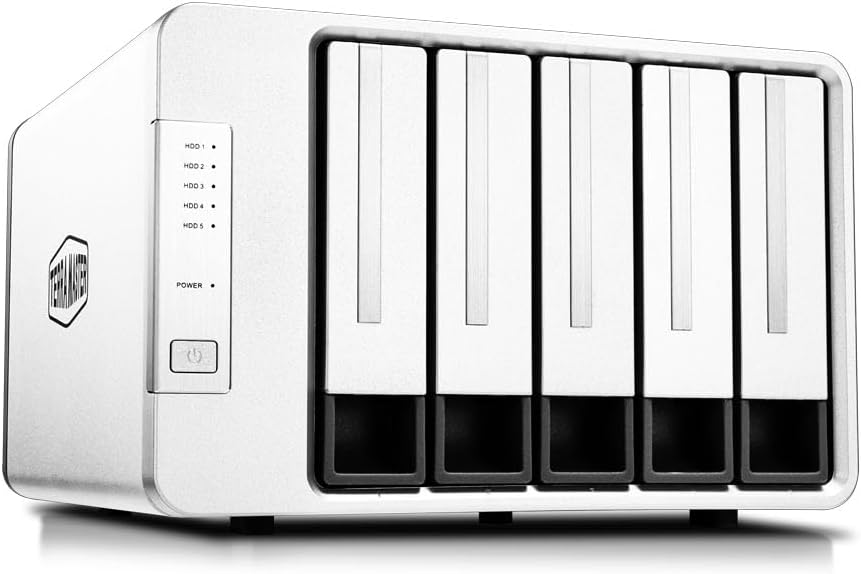


The TERRAMASTER D4-320 is a robust direct attached storage solution designed for professionals who need high capacity and speed. It holds four drives in a tool-free design and connects via USB 3.2 Gen2 to deliver impressive data throughput.
We may earn a commission when you buy through this link, at no additional cost to you.
This model achieves read speeds up to 1016 MB per second when equipped with four high capacity drives making it ideal for video editing and large dataset transfers. The push lock mechanism ensures drives stay secure while allowing easy access for replacements without tools.
While it does not support hardware RAID which limits redundancy options the individual drive access simplifies file management and recovery. The intelligent cooling system keeps noise low during standby which is beneficial for quiet office environments.
We recommend this unit for users who need maximum capacity expansion without the complexity of network attached storage systems. It is a reliable choice for workstation upgrades where speed and flexibility are the top priorities.
The USB 3.2 Gen2 protocol ensures that large files transfer quickly reducing wait times for creative workflows.
The tool-free tray design allows users to install drives instantly without needing screwdrivers or extra hardware.
We may earn a commission when you buy through this link, at no additional cost to you.
The QNAP TR-004 serves as a powerful expansion unit for existing QNAP network attached storage systems while also working as a standalone USB device. Its hardware RAID capability offers data redundancy options that are rare in standard external enclosures.
We may earn a commission when you buy through this link, at no additional cost to you.
Users can configure the four drive bays for different RAID levels to balance speed and safety depending on their data needs. The lockable bays prevent accidental drive removal adding a layer of physical security to your storage setup.
Compatibility notes indicate that not all QNAP models support this expansion so checking your system version is essential before purchase. The USB Type-C connection ensures fast data transfer rates suitable for modern high bandwidth applications.
This device is the perfect choice for QNAP users needing more space without moving to a larger server chassis. It bridges the gap between simple external drives and complex network storage solutions effectively.
Hardware RAID support allows for data protection without relying on software which can slow down performance.
The lockable drive bays protect against accidental removal in shared office environments.
We may earn a commission when you buy through this link, at no additional cost to you.
The TERRAMASTER D8 Hybrid offers a unique combination of traditional hard drives and modern NVMe SSDs in a single enclosure. This hybrid approach lets users optimize their storage by placing frequent files on fast SSDs while storing archives on high capacity HDDs.
We may earn a commission when you buy through this link, at no additional cost to you.
Read speeds reach up to 980 MB per second on NVMe drives which significantly improves workflow efficiency for video editing and 3D rendering tasks. The tool-free design applies to both drive types making maintenance straightforward for technical users.
Users must manually manage drive allocation to maximize performance which requires some technical knowledge. While the feature set is advanced the complexity can be a barrier for those looking for simple plug and play solutions.
This unit is best suited for power users who need both speed and massive storage capacity in a single device. It represents a sophisticated approach to storage management for demanding creative professionals.
Separating hot and cold data across drive types improves access speeds and reduces storage costs.
With support for 152TB total capacity this unit can handle years of media archives.
We may earn a commission when you buy through this link, at no additional cost to you.
The CENMATE Aluminum 4 Bay provides a cost-effective solution for users who need to expand their storage capacity without breaking the budget. Its aluminum chassis helps dissipate heat effectively which is crucial for maintaining drive longevity under load.
We may earn a commission when you buy through this link, at no additional cost to you.
Despite the lower price point it supports hot swapping and tool-free installation which are premium features in this range. The USB 3.0 connection delivers up to 5Gbps which is sufficient for most backup and media streaming tasks.
The included cooling fan ensures drives do not overheat during long sessions though noise levels may be noticeable in quiet rooms. It is a sturdy option for home offices or small businesses needing reliable multi-drive storage.
We recommend this enclosure for users prioritizing value and build quality over cutting edge transfer speeds. It handles up to 80TB total which is plenty for personal backups and project archives.
The aluminum build ensures longevity while keeping the price low compared to competitors.
Support for both 2.5 and 3.5 inch drives allows reuse of existing hard drives from laptops or desktops.
We may earn a commission when you buy through this link, at no additional cost to you.
The SABRENT 5-Bay enclosure stands out by providing a dedicated ASMedia controller for each drive bay. This architecture ensures that one drive failing does not impact the connection of others offering exceptional stability for mission critical data.
We may earn a commission when you buy through this link, at no additional cost to you.
Its USB-C connection supports 10Gbps speeds and the unit can be daisy chained to connect other peripherals without needing more ports. The internal power supply eliminates the need for a bulky external brick keeping the desk area tidy.
Hot swapping is supported and each bay has its own switch and LED which makes identifying specific drives easy during operations. This level of control is rare in consumer enclosures and benefits professional workflows.
Choose this model if you need reliability and multi-drive access for large scale backup or media server setups. The higher cost is justified by the robust engineering and performance stability it offers.
Each drive gets its own connection path ensuring consistent performance across all five bays.
The internal power supply removes the need for an external brick reducing cable clutter on your desk.
We may earn a commission when you buy through this link, at no additional cost to you.
The TERRAMASTER D8 Hybrid 2 improves on its predecessor with better power management and drive compatibility. It retains the hybrid bay design allowing simultaneous use of HDDs and NVMe SSDs for a versatile storage configuration.
We may earn a commission when you buy through this link, at no additional cost to you.
Read speeds can reach 1020 MB per second on NVMe drives which drastically cuts export times for large video projects. The TPM technology optimizes energy use and wake times which helps efficiency in busy workstations.
With support for Thunderbolt 5 interfaces it future proofs your investment for upcoming high bandwidth standards. The user feedback indicates a perfect satisfaction rate suggesting reliability matches the high performance specs.
This premium unit is ideal for creative professionals who need maximum speed and capacity in a single device. It justifies its price through advanced features that support demanding workflows effectively.
Compatibility with Thunderbolt 5 prepares your setup for future high speed interface needs.
Proprietary power management allows for quick wake times without sacrificing energy savings.
We may earn a commission when you buy through this link, at no additional cost to you.
The TERRAMASTER D5-310 distinguishes itself with a physical RAID knob on the rear that allows users to switch modes without software. This hardware based approach ensures redundancy is managed at the drive level which can be faster and more reliable.
We may earn a commission when you buy through this link, at no additional cost to you.
It supports a hot spare disk that automatically replaces a failed drive in RAID configurations to minimize downtime. This feature is particularly useful for users who need continuous availability without manual intervention during failures.
While the RAID setup provides safety the process can be tricky for users unfamiliar with array configurations. The included backup software adds value but works best on Windows environments which limits cross-platform flexibility.
Choose this model if you need hardware level redundancy for critical local backups. It offers a balance of high capacity and data safety suitable for small offices.
The hardware RAID knob allows easy switching between protection modes without software installation.
Hot spare support ensures automatic recovery from drive failures to keep data safe and accessible.
We may earn a commission when you buy through this link, at no additional cost to you.
The WAVLINK 4-Bay enclosure adds unique video output capabilities to a standard storage device. It includes an HDMI port that supports 4K resolution which is great for connecting directly to monitors without using computer ports.
We may earn a commission when you buy through this link, at no additional cost to you.
Independent power switches on each bay allow for precise control over which drives are active. This can help manage heat and power usage when not all drives are needed for a task.
The aluminum build ensures good heat dissipation while the temp controlled fans kick in only when needed to save noise. It supports fast 10Gbps transfers and offers extra USB ports for peripherals.
This unit is best for users who want a hub that combines storage and connectivity to reduce cable clutter. The video output makes it versatile for presentation setups or media centers.
The HDMI port allows direct display connection saving your computer ports for other tasks.
Independent power switches let you turn specific drives on or off to save energy and power.
We may earn a commission when you buy through this link, at no additional cost to you.
The ORICO 5 Bay features a magnetic cover design that allows for tool-free access to the drives. This simplifies the installation process significantly and reduces the need to carry screwdrivers during setup.
We may earn a commission when you buy through this link, at no additional cost to you.
It supports up to 110TB total capacity which is ample for extensive media libraries and backups. The unit includes multiple safety protections against over voltage and overheating to ensure data integrity.
Indicator lights help monitor drive status at a glance allowing for quick checks on health and activity. The USB-C interface ensures compatibility with modern laptops and desktops.
This model is recommended for users who prioritize ease of installation and a clean look on their desk. It balances cost with high capacity and solid build quality for general use.
Magnetic chips on the cover mean no screws are needed for opening or securing the unit.
Multiple protection designs guard against electrical surges and heat to keep data safe.
We may earn a commission when you buy through this link, at no additional cost to you.
The QNAP TR-002 is a compact direct attached storage unit ideal for users with limited desk space. It offers two drive bays and hardware RAID support providing data protection in a smaller package.
We may earn a commission when you buy through this link, at no additional cost to you.
It integrates seamlessly with QNAP NAS systems to expand capacity without requiring a new server. The USB-C interface ensures fast transfer speeds and broad compatibility with modern operating systems.
Lockable drive bays add security and stability for mobile or shared environments. The design is sleek and fits well into professional setups.
We suggest this unit for users who need a small expansion solution with data safety features. It is a great choice for small offices or home labs needing reliable storage.
The compact design takes up minimal desk space while providing essential storage expansion.
Lockable bays prevent accidental removal of drives keeping data secure in shared spaces.
We may earn a commission when you buy through this link, at no additional cost to you.
Selecting the right direct attached storage unit requires evaluating several key factors to ensure performance and reliability.
The connection interface determines how fast data moves between your computer and the drives. USB 3.2 Gen2 and Thunderbolt offer the highest speeds essential for large file transfers.
Always verify your computer has the necessary ports to avoid bottlenecks in your workflow.
Check the maximum supported drive size and total capacity to ensure future needs are met. Enclosures vary from supporting 10TB to over 100TB depending on bay count and controller limits.
Choose a unit that allows room for growth to avoid replacing the case soon after purchase.
Hardware RAID provides data redundancy without software overhead but adds complexity to setup. Decide if you need data protection or raw speed when selecting a model.
Look for models with clear RAID switching mechanisms if redundancy is a priority for your data.
Effective cooling is vital for maintaining drive health during long sessions. Look for units with fans and aluminum chassis to dissipate heat efficiently.
Noise levels vary so consider your environment if you plan to use the device in quiet spaces.
The number of drive bays defines how many drives you can install at once. More bays allow for larger total capacity but require more physical space.
Ensure the tray design supports your preferred drive type and offers easy access for maintenance.
Verify that the unit works with your operating system without needing complex drivers. Most modern units support Windows and Mac but specific features may vary.
Test compatibility if you plan to use the enclosure with servers or specialized software.
A sturdy aluminum case offers better durability and heat dissipation than plastic. Look for robust locking mechanisms to protect drives from physical damage.
Investing in a high quality build ensures the device lasts through years of daily use.
Start by installing your drives securely into the bays ensuring all connections are tight and safe. Follow the specific instructions for your model to avoid damaging the connectors or the drives.
Connect the enclosure to your computer using the included high quality cable for best performance. Allow your system to recognize the new storage and partition or format it as needed.
Regularly monitor the temperature and noise levels to catch early signs of failure or overheating. Keep the unit in a well ventilated area to maintain optimal operating conditions.
Direct Attached Storage or DAS connects directly to a computer via a cable like USB or Thunderbolt. It provides fast data access without needing a network connection for local workloads.
RAID is optional but useful if you need data protection from drive failure. It adds redundancy but can reduce total usable capacity and increase cost.
Most DAS units support standard SATA and some support NVMe or USB drives. Check the product specs to ensure compatibility with your specific drive size and type.
Use daisy chain capable models or connect them to different ports on your computer. This allows for expanding storage without replacing a single unit.
Many modern DAS units support macOS with plug and play drivers. However specific RAID features may require third party software on Mac systems.
Place the unit in a well ventilated area and avoid enclosing it in tight spaces. Clean dust from vents regularly to ensure fans can operate effectively.
Choosing the right direct attached storage unit depends on your need for speed capacity and data safety. The models reviewed here offer options for budget users and professionals alike.
Prioritize interface speed and cooling if you work with large files daily. Look for tools-free designs and reliable brands for long term satisfaction.
Prices and availability change often so check current listings for the best deals before buying.