
HDMI Tester Portable High Definition Network Cable Tester Checker
4.4Editor score
Tests HDMI and RJ45 cables
Portable main and remote unit
USB or AAA battery powered
This guide compares the top HDMI Cable and Port Tester models to help you choose the right tool for verifying cable continuity and signal integrity.
Finding the right HDMI Cable and Port Tester ensures your video connections work flawlessly. Whether you are a technician or a home enthusiast, reliable testing tools save time and prevent display issues.
We evaluated ten top-rated testers based on features, ease of use, and customer feedback. This list covers portable units, advanced signal generators, and comprehensive diagnostic boards for various HDMI versions.
Each pick highlights key strengths and ideal use cases for different needs. Please note that product availability and pricing can change frequently, so check current listings before purchasing.
4.4Editor score

4.8Editor score

4.5Editor score
The following table provides a side-by-side look at the key specifications and capabilities of each HDMI Cable and Port Tester included in this review.


This HDMI tester is an affordable solution for verifying HDMI and network cable continuity. It holds a solid rating and offers essential testing capabilities for casual users or budget-conscious technicians.
We may earn a commission when you buy through this link, at no additional cost to you.
The device includes a main unit and a remote unit that stores conveniently on the side. It can scan up to 19 wires to detect short circuits, open circuits, or incorrect wiring orders efficiently.
While it lacks advanced signal generation features, its ability to work with both HDMI and RJ45 connectors makes it versatile. Power options include an AAA battery or a USB charger, adding convenience.
Anyone needing a simple tool to check cable integrity without breaking the bank will find this useful. It is a practical choice for quick diagnostics in home or small office environments.
Supports HDMI Type A and Mini Type C connectors as well as RJ45 network cables for broad compatibility.
The remote unit stores on the main unit making it easy to carry during fieldwork or travel.
We may earn a commission when you buy through this link, at no additional cost to you.
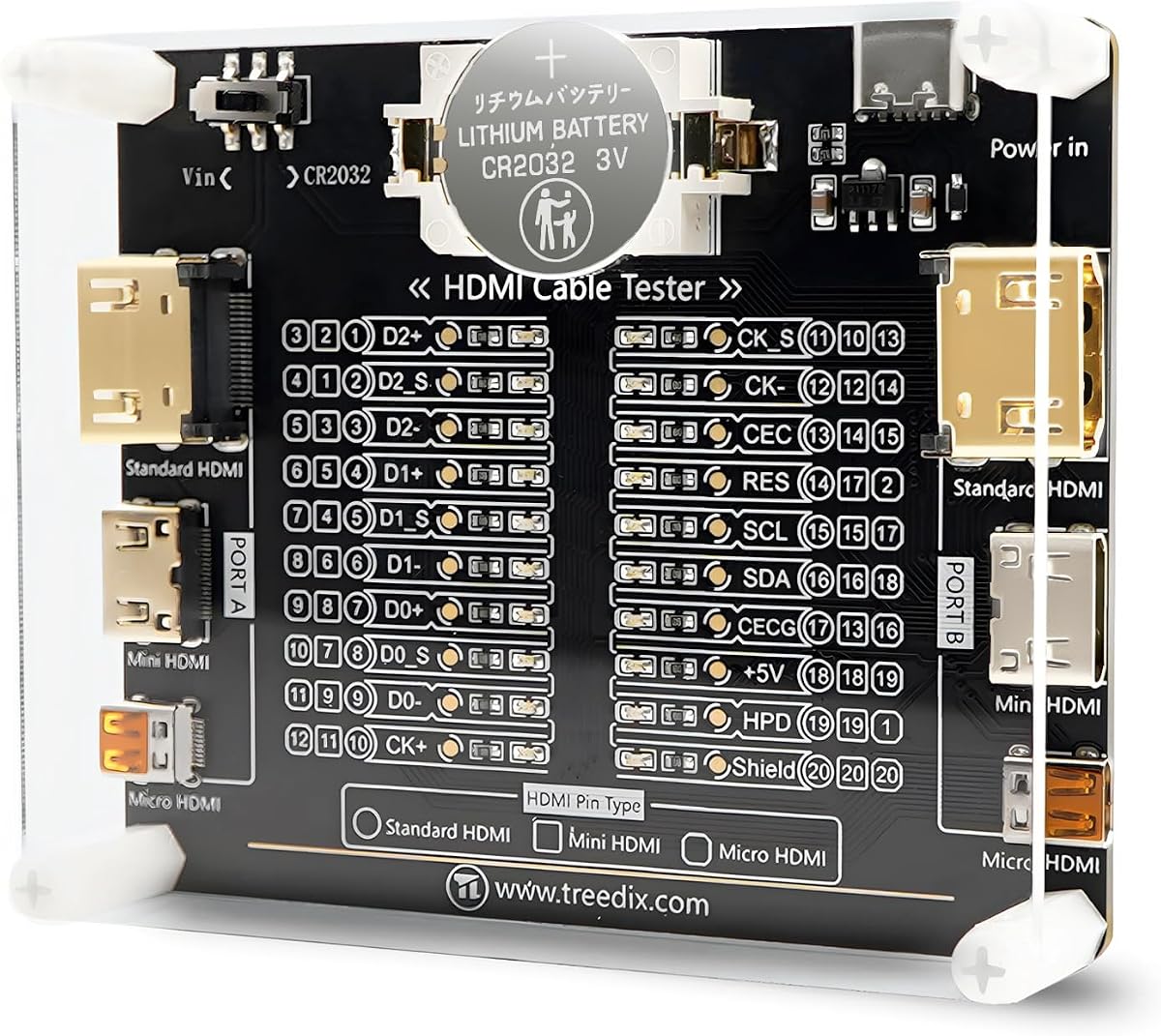
The Treedix Cable Tester Board is designed for detailed HDMI cable condition checks. It features a high rating and offers a clear visual display of pin connectivity using 20 LED indicators.
We may earn a commission when you buy through this link, at no additional cost to you.
Each LED corresponds to a specific pin helping users understand the cable function quickly. It supports various interfaces including Type A, Mini Type C, and Micro Type D for versatility.
Although it is a board design, it includes reverse connection protection and flexible power options. The acrylic housing helps protect the device during transport or storage.
Technicians who need to map pin sequences for maintenance will appreciate the detailed feedback. It is a reliable tool for ensuring HDMI cables meet specific standards.
20 LED indicators provide a clear visual map of every pin connection for accurate troubleshooting.
Comes with an acrylic housing to protect the test board from damage during use.
We may earn a commission when you buy through this link, at no additional cost to you.
Jonard Tools offers a reliable HDMI-100 tester known for precision and durability. This model stands out for its detachable remote unit which allows testing of installed or long cables easily.
We may earn a commission when you buy through this link, at no additional cost to you.
It supports various HDMI versions from 1.2V to 2.0V and works on any cable length up to 500 meters. The full display mode shows all connections at once for quick verification.
Users can see individual connections being tested in scan mode for detailed analysis. The device requires a 9V battery which is a standard requirement for this class of tester.
Professional installers who need to test cables in hard-to-reach locations will find this invaluable. It ensures signal integrity with a trusted brand's quality assurance.
The detachable remote allows you to test cables that are installed in walls or ceilings up to 500m.
Choose between scan mode for individual pins or full display mode for a complete overview.
We may earn a commission when you buy through this link, at no additional cost to you.
This Monoprice device serves as both a signal generator and a display analyzer. It is ideal for testing display performance and HDMI signal integrity beyond simple continuity checks.
We may earn a commission when you buy through this link, at no additional cost to you.
It supports high-resolution outputs like 4K at 60Hz and allows control over HDCP content settings. This is useful for troubleshooting issues related to content protection or resolution handshakes.
Users can output specific test patterns to verify display performance and color accuracy. The DIP switches make it easy to configure resolutions and content settings manually.
AV technicians integrating set-top boxes or projectors will find this tool essential. It goes beyond cable testing to ensure the entire signal chain is functioning correctly.
Supports different HDCP versions and patterns to ensure compatibility with protected content.
Adjust video resolution and signal parameters using the included DIP switches.
We may earn a commission when you buy through this link, at no additional cost to you.
This portable tester combines HDMI and network cable functionality with energy-saving features. It is designed for quick verification of cable continuity and pin order.
We may earn a commission when you buy through this link, at no additional cost to you.
The auto shut-down function helps extend battery life by turning off the device after inactivity. Users can choose between a fast scan mode or a full display mode for comprehensive testing.
It supports HDMI connectors from Type A and ensures that up to 19 wires are checked accurately. This helps save time and money by quickly identifying faults.
For users who need a reliable tool that manages power efficiently this is a good option. It is suitable for occasional use where long battery life is preferred.
Automatic shut-down after 10 minutes of inactivity helps conserve battery power.
Switch between scan mode for speed or full display mode for detailed pin checks.
We may earn a commission when you buy through this link, at no additional cost to you.
The MFL Detachable Professional tester offers a wide range of connectivity options for AV and network cables. It is built for professionals who need to troubleshoot multiple signal types.
We may earn a commission when you buy through this link, at no additional cost to you.
With a detachable design it allows split testing of cables in different locations. The device includes ports for XLR HDMI USB RCA BNC and Type-C connections.
A 10-way switch and LED indicators provide instant visual feedback on connectivity status. The metal housing ensures durability during heavy use or transport.
Technicians working in complex setups with various audio and video standards will benefit most. It consolidates multiple testing tools into one robust device.
Includes ports for HDMI XLR USB RCA BNC and Type-C for extensive compatibility.
The detachable design allows testing cables that are split across different locations.
We may earn a commission when you buy through this link, at no additional cost to you.
The UT681 HDMI Cable Tester is highly rated for its reliability and ease of use. It focuses on verifying HDMI and mini HDMI cable connections with rapid analysis capabilities.
We may earn a commission when you buy through this link, at no additional cost to you.
It can quickly scan up to 19 wires to identify faults like short circuits or disconnections. The LED indicator zones show abnormal points clearly to simplify troubleshooting.
An intelligent power consumption feature warns users when battery voltage drops below 7.2V. The device automatically powers off after 10 minutes to preserve battery life.
Technicians and home users needing a dependable tool for HDMI verification will find this excellent. It balances features and usability effectively for regular testing tasks.
Blue light flash warns of low voltage and auto power-off saves energy.
Weighs about 175 grams and allows single-person field testing easily.
We may earn a commission when you buy through this link, at no additional cost to you.
This tester is designed to diagnose common HDMI issues like color shift or missing pictures. It is compact and portable making it easy to carry to different locations.
We may earn a commission when you buy through this link, at no additional cost to you.
You can plug cables into the DVI-F and HDMI-F connectors to test the signal components. The device can be located at either the source or display end of the system.
It displays the status of each HDMI signal component to help pinpoint the cause of visual problems. This makes it useful for troubleshooting display issues quickly.
Technicians or installers who encounter video artifacts often will find this tool helpful. It simplifies the process of checking signal integrity without complex setup.
Diagnoses color shift sparkle or missing picture issues effectively.
Tester can be placed at source or display end for flexibility.
We may earn a commission when you buy through this link, at no additional cost to you.
This tester stands out with a perfect rating for its ability to check both HDMI and LAN cables. It supports HDMI 2.1 making it future-ready for high-definition video.
We may earn a commission when you buy through this link, at no additional cost to you.
The remote unit stores conveniently on the side of the main unit for easy transport. It tests HDMI wires for faults and checks RJ45 connector continuity with rotating LED lights.
Power can be supplied by a 9V battery or a USB charger providing flexibility during testing. It is an all-in-one tool for AV and network cable verification.
Users who need to verify both video and data cables will find this highly effective. The high rating suggests strong customer satisfaction and reliable performance.
Supports HDMI 2.1 versions for the latest cable standards.
LED lights flash in rotation to confirm proper RJ45 wire connection.
We may earn a commission when you buy through this link, at no additional cost to you.
This STEREN tester offers a built-in HD LCD display for direct video and audio verification. It is designed for technicians who need to confirm signal integrity without a TV.
We may earn a commission when you buy through this link, at no additional cost to you.
The screen is resistant to dust water and scratches with a shock-proof housing. It includes three HDMI ports to connect to source devices and test cable continuity efficiently.
A 2300mAh battery provides 3-4 hours of use time and the device is protected by US patent. It helps ensure set-top boxes are installed correctly and channels work.
Professionals who need a standalone tool for on-site verification will find this premium option valuable. The rugged design ensures longevity in demanding work environments.
Built-in HD LCD shows audio and video without needing an external display.
Hybrid dual layer housing is shock proof and resistant to water and scratches.
We may earn a commission when you buy through this link, at no additional cost to you.
Selecting the right tester depends on your specific testing needs and the types of cables you use.
Consider whether you need to test HDMI cables only or if network cables like RJ45 are also required. Some units offer basic continuity checks while others provide detailed pin mapping.
Evaluate if your setup demands simple wire testing or advanced signal generation for full system verification.
HDMI standards evolve over time so ensure the tester supports your required versions. Most devices cover 1.2 to 2.0 but some newer models include 2.1 support.
Check the product specs to confirm compatibility with high-bandwidth or enhanced features like HDR.
Different units rely on different power sources like AAA batteries 9V batteries or USB charging. Some may have auto-shutdown features to save power.
Choose a power option that aligns with your workflow to avoid interruptions during fieldwork.
Portability is key for technicians moving between locations. Look for compact designs with detachable remote units if testing long or installed cables.
A rugged housing can protect the device from damage during transport or in industrial environments.
Most testers use LED indicators to show pin status but some offer an LCD screen for visual output. A screen can be more informative for troubleshooting video issues.
Select a display method that provides the clarity you need for quick decision making.
Some models include features like low battery warnings or specific signal generation modes. These extras can improve efficiency and reliability.
Weigh whether advanced features justify the cost for your typical usage scenarios.
A durable build ensures longevity especially if you use the device frequently. Metal housings or shock-proof designs are beneficial for rough environments.
Investing in a robust tester can prevent frequent replacements and save money long term.
Prices vary widely from basic testers to professional grade units. Determine your budget based on how often you need to use the device.
Basic testers suffice for occasional checks while professionals may need advanced tools for daily work.
Start by connecting the main unit to the cable end at the source and the remote unit to the display end. Ensure the devices are powered on correctly using the appropriate battery or USB supply.
Observe the LED indicators or screen to check each pin status. If all lights match or a continuous signal appears the cable is likely functioning. If some lights are off or flashing irregularly there may be a fault.
To care for your tester store it in a protective case when not in use. Avoid exposing the device to extreme temperatures or moisture and keep the ports clean to ensure accurate testing.
An HDMI tester verifies cable connectivity and signal integrity by checking for shorts open circuits or wrong wire orders. It helps identify physical cable faults before troubleshooting complex signal issues.
Some modern testers support HDMI 2.1 while others cover up to 2.0. Always check the product specifications to ensure compatibility with the HDMI version of your cables and devices.
Basic testers check continuity and wiring faults. Advanced models with signal generation can assess signal quality and performance but simple units focus on physical connection verification.
Yes professional grade testers are designed for technicians who need reliable diagnostics. Units with detachable remotes or display screens are often preferred for complex installation jobs.
Battery life depends on usage and power saving features like auto shut-off. Typically you can expect several hours of active use from standard batteries before needing a replacement.
Many models include RJ45 network testing capabilities alongside HDMI. Verify the product details to confirm it supports the network cable types you intend to test.
Warranty terms vary by manufacturer and seller. Some brands offer limited warranties so it is advisable to review the product page or contact support for specific coverage information.
The top picks offer a range of solutions from budget-friendly continuity testers to advanced signal analyzers. Each model brings unique strengths depending on your specific requirements and budget.
Prioritize features that match your workflow such as HDMI version support portability and power options. Selecting the right tool ensures accurate diagnostics and saves valuable time.
Always check current prices and availability before purchasing to get the best deal. With the right tester you can ensure your HDMI connections perform reliably.